r/linuxquestions

▲ 0 r/linuxquestions+1 crossposts

What's the benefit of using Ubuntu? Most packages are old - discussion

Hey,

first of all, I came back to Ubuntu from another Arch based distro because I wanted to test but there are a few things which are kinda meh.

So for example, when installing software over the CLI via apt, a lot of software is out of date. Is this supposed to be the case? One example is rclone. When I install rclone, an older version will be installed. This could cause issues because security wise this is not good. I remember, for example, older versions had issues with the RNG for password generation making passwords not completely random.

There are other apps which face the same issue. Is there a "workaround" or is this expected?

BTW: how old are Nvidia drivers on Ubuntu?

reddit.com
u/ThatrandomGuyxoxo — 1 hour ago

Best Linux Distro for Painless NVIDIA Experience

I’m not a gamer, I’m using a Lenovo Legion 5 that was gifted to me (im broke and cant buy my own laptop)

I daily drove arch since 2021 when I was still an Intel user. As responsibilities eventually piled up, I had less time available for fixing stuff when things break, so I just sticked to Windows (things just works without fixing much). I haven’t kept up much with Linux stuff after moving to Windows

I rely on my laptop a lot since I’m studying something computer related for my degree. I currently have a dual boot setup with Windows and Fedora but I still have issues after every update in Fedora.

Current problems with Fedora: 1) Cant shutdown my PC, 2) BIOS issues, 3) and Cant even use Open-CV properly because of some qt xcb wayland issue (which used to work properly until I updated)

Im looking for three things in an ideal distro:

  1. Easy to setup
  2. Doesnt break too often
  3. Good NVIDIA support

I dont care for gaming performance. I just want something reliable. I know a lot of useful stuff in Linux that aren’t available on Windows, so I really want to daily drive it but can’t

reddit.com
u/ZherkaUnofficial — 3 hours ago
▲ 2 r/linuxquestions+1 crossposts

Any experience installing Asahi Linux on M1 or M2 Mac minis

My question is, installing Asahi Linux on M1 or M2 Mac minis and using it as a desktop computer is a good decision? Is there any hassle during installation or when using it? Any advice, experience, or other alternatives?

reddit.com
u/zarinfam — 1 hour ago

How did Linux "know" it wasn't updated when not online?

Hey all, just a quick question based on something that happened to me the other day that was kind of perplexing me. I had Mint on an old laptop that I last booted around 2.5 years ago. When I first booted it up, Mint took quite a long while to start (a full 20 minutes). Once I got online and got everything updated, it all runs super-fast again. But my question is like... since the laptop wasn't online during that first boot, and it wasn't as if any new programs had been installed or anything in the intervening years the laptop wasn't booted up, how did it "know" it wasn't updated? Why was it slow?

I'm thinking analogously of what might happen if I went and turned on a vintage IBM 386 or something with DOS on it. Even if it hadn't been powered on in ten years, it would, assuming the hardware was good, just boot right up into DOS with seemingly no distinction between whether it had last been booted the day before or a decade before. What's the explanation here?

reddit.com
u/MistressBlackleaf — 8 hours ago

Clam AV Daemon Issue / Fedora - Nobara

Made the switch to Nobara and and installed Clam UI. It shows the ClamAV daemon is not running and offers a commandline to start the daemon. However the terminal the daemon can't be found when executed in terminal, despite it being installed in the dnf.

ClamAV installation OK

Freshclam service ACTIVE

How do I proceed to find the issue, please?

reddit.com
u/monokoi — 3 hours ago

I'm having a problem with Steam; I can't open it.

Ever since I installed Linux on my laptop, I've always had this problem with Steam. The application is there, but no matter how many times I click on it, the window doesn't open. What should I do?

reddit.com
u/YumeYume3212 — 6 hours ago

Which Ubuntu flavor?

Ok, so here are the specs of the trash laptop I have:

  • 32GB storage
  • 4GB of LPDDR4 RAM
  • Celeron N4020

Which Ubuntu flavor should I choose for this laptop? I want something that will bring new life to the laptop and make sure it’s lightweight and functional.

reddit.com
u/HotSystem9814 — 10 hours ago

Debian 12 audio output keeps switching and making noise, even though the hardware is fine

Hi! I’m looking for help with a persistent audio issue on my fresh Debian 12 installation.

My system keeps switching the audio output back and forth on its own, as if I were constantly plugging and unplugging my headphones into the rear jack. The hardware is perfectly fine, but the system software is acting up, causing the settings to jump around and producing constant, annoying noises in my headphones.

This is not how an audio system should behave. I need a permanent, clean way to disable this automatic jack detection/switching entirely so that my audio output remains stable and the noise stops.

Does anyone know how to force the system to ignore these false signals and just keep the audio output fixed? I am looking for a reliable, permanent fix that doesn't require constant manual adjustments.

Any help would be greatly appreciated.

reddit.com
u/Difficult_Tip_9307 — 9 hours ago

how would i be abled to make a bootable partition?

guys

don't bully me i don't know anything about this

i want to install a new os

and i saw that you can make a bootable partition somewhere on reddit

i don't have any money to spend to buy a sd card/usb drive

i am using kde plasma 6

reddit.com
u/AsheTheAssLMAO — 12 hours ago

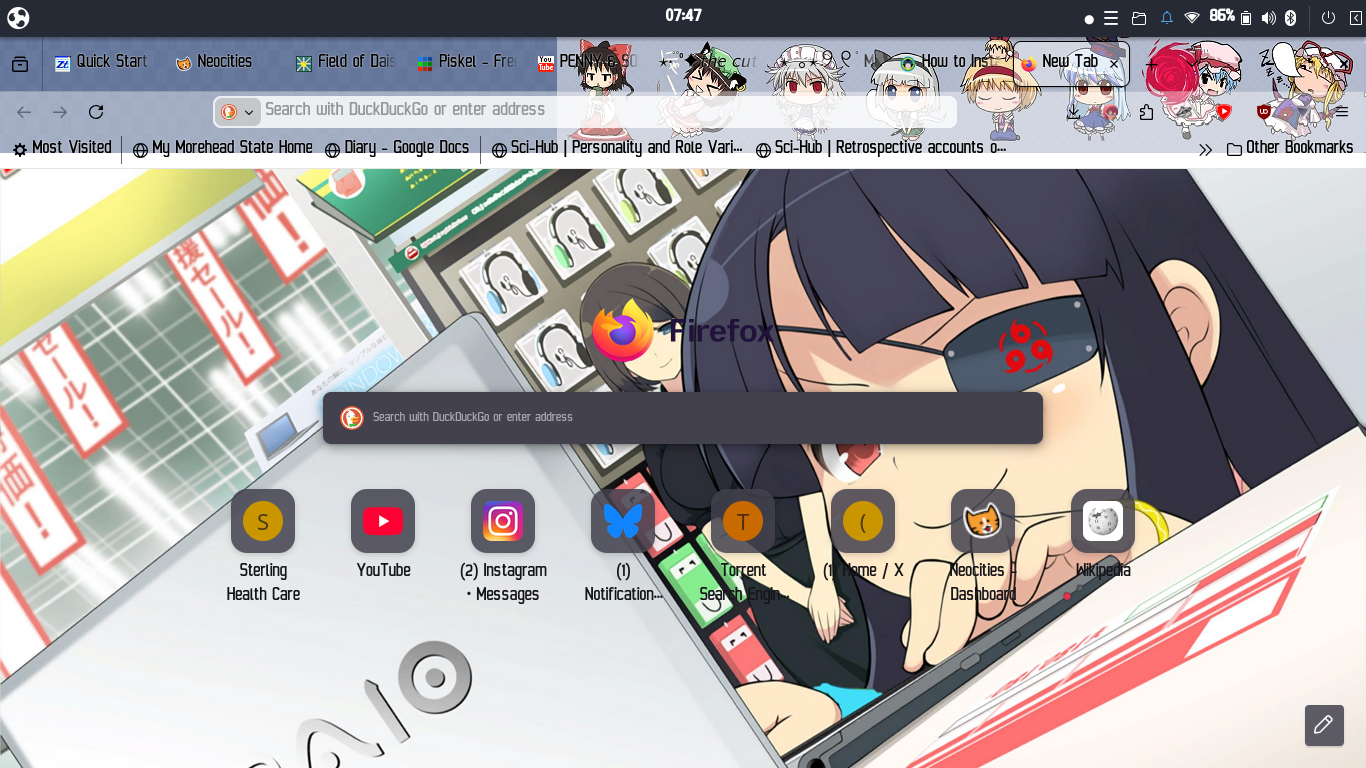
How to fill the UI with obnoxious anime junk?

Hi! Here's what my install of firefox currently looks like: https://files.catbox.moe/16oe9m.png

How do I do that for the entire computer? I mean the file explorer, the terminal, the UI elements of budgie, everything. Bonus points if I can just open a gif of cinnamoroll or something and have it play constantly on the desktop. Any ideas?

EDIT: looks like i've gotten it as close as possible. icon packs'll have to do but it'd be goated to have an anime background on the file explorer and such. look through the comments for links to what i ended up doing :3

u/WingedSeven — 12 hours ago

How to create custom cursors for Wayland?

I want to create my own custom mouse cursor. AFAIK the way to do this on x11 is xcursor. How do I do this for wayland? Can I, or do I have to, still use xcursor? Or is there a wayland-native application or system?

reddit.com
u/Shindiggidy — 9 hours ago

Switching to Linux (Surface pro 7+)

Hi!

I am looking to switch completely from windows to linux.
My computer is a surface pro 7+ (includes touchscreen).

The linux distro that I am looking for, hopefully can hopefully be used for work. The distro should be able to use easily:

  1. Microsoft Word
  2. Clip studio paint.
  3. Microsoft Edge.
  4. Front and back cameras of the surface pro 7+
  5. Touchscreen

Any distro that can do these things would be great. Thank you again for your help.

reddit.com
u/Sanguiset — 13 hours ago

Can someone explain how rsync --info=progress2 determines ETA?

I've been gradually rsync'ing a 5.3 TB folder on and off over the past few days, starting and stopping the command repeatedly.

The first rsync command showed a 30 hour ETA. The current rsync command, after 4.85 TB (i.e. ~450 GB remaining) is showing a 97 hour ETA.

Is rsync somehow making a calculation based on total elapsed time since the first rsync command, including all the time where the command wasn't even running?

reddit.com
u/Middle-Beautiful6007 — 6 hours ago

Is XFCE is better at customizing than Cinnamon?

I watched few xfce mint customization it feels xfce provides more customization options than mint cinnamon and also the handholding come free with xfce mint. Is it really? or am i fooling myself to install mint xfce

reddit.com
u/FAMPpro — 14 hours ago

What's the easiest way to actually game on Linux?

​

I've been trying to make Linux work for gaming for a while now, and I keep hitting the same wall. I'm not giving up — I just need some honest guidance from people who actually use it daily.

Here's everything you need to know about my situation.

My specs

CPU: Intel Core i3-7100U (7th gen)

GPU: Intel HD 620 (integrated)

RAM: 4 GB DDR4

Storage: 120 GB SSD

What I've already tried

Ubuntu — loved the look, but way too heavy for my hardware. Everything felt slow from the start.

Arch — I respect it, but the manual setup was too much for me. Not there yet.

Debian — solid reputation, but I couldn't get it properly configured. Too much friction for daily use.

Linux Mint XFCE (current) — the best experience so far. It's light and stable, but gaming performance still feels off. Things that should work out of the box often don't.

What I actually want to do

My gaming needs are simple — I'm not chasing high-end titles. I just want to run:

Roblox (the native Linux client)

Minecraft

A few lighter Steam games

All I want is for these to run smoothly and consistently, without spending hours troubleshooting every time.

What I'm looking for

Something beginner-friendly, lightweight enough for my hardware, and with solid out-of-the-box gaming support. I don't mind some tweaking — as long as there's a clear path forward.

If you've found something that genuinely works for this kind of setup, I'd love to know what it is and why it solved what Mint XFCE didn't.

reddit.com
u/Firm-Milk-1160 — 16 hours ago

weird networking issue on Asus E1404FA

This is probably gonna sound ridiculous. I've tried posting this before but it didn't get to see the light of the day. I'm gonna try this again, and ask if any of you have had similar situations to mine.

Again, this is gonna sound ridiculous, so ridicule me if you want.

As stated on the title, I have an Asus vivobook don't go E1404FA, it's a generic low-end laptop that has barely enough power to do stuff on windows. So, near the end of March, I decided to install Linux Mint along with windows, essentially dual-booting. While I enjoyed the experience on Linux Mint after a while, I was using USB tethering the whole time since the network card; the MT7902 wasn't supported by the kernel yet so there was a time when I decided to resort to OOT drivers.

Fyi, the only reason I even tried doing OOT drivers was because the USB tethering(actually, also the wifi) is just so unstable. By unstable, I mean it would do just fine for a bit, then it would suddenly no longer work, then it would suddenly come back up again.

I wasn't too sure what it was at the time, so I just installed OOT drivers thinking they would work.

But then the OOT drivers installation failed since I was an absolute noob when it came to this stuff and before I knew it, the kernel panicked, and so did I.

I then gave up on OOT drivers for a bit and decided to distro-hop to KDE Neon, where I found another funny thing about this whole instability thing. While on KDE Neon, I did more testing and researching regarding my particular instability, where I found out that I couldn't find anyone else with the same issues as me, and I also found out that if I open the KDE Plasma network manager thingy to show the speed of the internet connection, the connection gets "ressurected" and works again, until I close out of it. As another information, no, it wasn't disconnecting and reconnecting, it was always connected but there seemed to be times with no data stream at all.

I then tried pinging my own router via the terminal a few times, which resulted in quite weird results. Ping was 50% of the time fine, with it floating aroung 5-10 ms, but then 30% of the time, the ping with tthe ROUTER spikes up to thousands(1000-9000 ms) which was NOT supposed to happen fyi, and then the rest 20% was the ping not being able to ping.

I went to several LLMs to help me diagnose and fix this(sorry, guys) such as Claude, ChatGPT, and Gemini but none worked.

Eventually I got so frustrated and then I just installed different OOT drivers, this time a backported version of the 7.1 kernel's existing MT7902 drivers. It miraculously worked.... until I realized

The instability wasn't a USB tethering problem.

It was both tethering, and wifi.

And that complicates things further.

edit 2 : this meant that this couldn't be an issue with drivers, and I also tried other distros and kernel versions and the same issue still stayed there. It works fine on windows btw.

//edit 2 end

So from that point I just decided to leave and see if Kernel 7.1 would eventually fix things(I highly doubt so), but honestly after not having linux on my computer I miss it so badly bro.

I still have 2 ext4 50 GB partitions on my nvme, just sitting there waiting for the day of the linux desktop.

If all of these sounded ridiculous, it's because it is. Ridicule me if you want, I'm not some super tech-savvy guy so I obviously did things wrong.

Thanks for reading, and please provide more information about:

  1. What probably happened to me
  2. If anyone else had this

and no, I don't have any screenshots and stuff, they won't help much.

sorry for wasting your energy to read all this lol

has anyone experienced this too and is there a solution?

reddit.com
u/X_xsansxV — 7 hours ago

Does a program working with musl imply that it will work with glibc?

I've been reading about the differences between musl and glibc. This musl page seems to be the main source of functional differences, as opposed to say, philosophical differences.

The sense I get from that page is that if a program works properly when linked against musl, then it will probably work when linked against glibc, since musl does things more "correctly", while glibc does some things "incorrectly" in a way that programs may rely on. Is that an accurate assessment, or is there a case where targeting musl would cause a program not to work with glibc?

If my assessment is accurate, then it seems like it would make sense for developers to target musl over glibc, for wider compatibility.

(Obviously one could write some code that had a compile error or bad behaviour specifically if glibc specific symbols are present, but I mean assuming one is generally trying to be compatible, but only testing against musl.)

reddit.com
u/Ryan1729 — 13 hours ago
▲ 40 r/linuxquestions+1 crossposts

Switching to Linux as daily driver

A recent YT video about installing games on Linux (specifically CachyOS, that i honestly didn't know existed... there's so many distros now!?) caught my attention and got me pondering an actual switch. I guess it got pushed by YT cause i've been following Valve's news lately, with their Steam Machine, Proton etc and naturally their push for Linux Gaming.

Anyway, switching to Linux has been in the back of my mind for a long time. I have always been curious about it and have started playing around with Linux (without going super deep, mind) ever since i got the courage to "risk breaking my PC" by installing shit on it on my own, around early 2000s. Today i am 42 years old engineer, a husband and dad, but also a geek and a big gamer. I am getting really sick of Microsoft's bullshit, the crazy bloat Windows is nowadays, eating tons of RAM to just run the OS, the constant enshitification of the OS (i am still using Win10, refusing to switch to that pile of shite Win11), the constant risk of viruses etc. However, me being a big time gamer as a main hobby and the general "dependence" on windows-based software has kept me away from really making the switch to Linux for now as my daily driver for my main PC. I use Linux on my travel PC since it's way lighter and better than Windows nowadays for simple travel tasks (mails, maps, banking, simple office type tasks, etc usual things), but i haven't really bothered installing it on my main PC for a good while. I have to admit, i hadn't realised how far Linux has actually gone in terms of gaming.

Reading through some posts and watching a few videos, it seems like it's almost there... but is it really?

I will list my main uses-cases for my home PC here, with some comments and questions:

  • General use - web, office, whatever - seems pretty much set to me. Compatibility with MS Office files is not 100% seamless and the tools like OpenOffice are maybe a bit less sophisticated than MS Office but it's good enough. Which is the "best" office solution nowadays? I remember using Libre Office and Open Office and i know that the EU is building it's own Office thing right now...
  • Photo editing - my second hobby is photography, so i use Adobe Lightroom a lot. I believe there's no native Linux port ? What's the best way to run LR on Linux ? I know there are some alternatives, some are even free/open source, but so far i haven't found anything that can really replace LR in a definitive way. Any suggestions, if running LR doesn't work well for now?
  • Gaming - the big blocker for me - Years ago, when i was playing around with Debian, there was no Proton, Wine was a young thing and wasn't really... great. All in all, gaming on Linux was not worth it. As i said earlier, things seem to have changed A LOT since then. What's even more encouraging is that Valve are building their whole hardware branch on Linux, and them being the biggest company in PC gaming, i believe things will only get better from now on. Maybe companies will start writing native Linux editions of their games too one day... In the meantime, there are a few questions still tho
    • Compatibility through Proton vs SteamOS - the official SteamOS page claims they have over 18k games compatible now... but does that also mean they are all compatible with any Linux+Proton setup too?
    • New games compatibility - Since Proton, if i understand correctly, is a layer that "translates" windows code and sits between games and the OS, it itself needs to be updated to support new releases? Is it case-by-case or more broader compatibility sweeps? Can games be compatible right "out of the box" ? How fast does the project move, currently?
    • ARM vs x64 - I know Valve's main focus is on ARM architecture, since their HW runs on it... is the x64 version of Proton affected negatively by that? (Held back, slower, etc)
    • Multiplayer and anti-cheat - The big one, i guess. The last few years i've been playing more MP than SP games so this is a big concern for me. I found some info about Steam "working hard" on anti-cheat integration in their HW AND Proton, but no real dates or anything solid. I also found this site - https://www.gamingonlinux.com/anticheat/ - according to which Squad, Deadlock and Arc Raiders, Broken Arrow (games i currently play) should work with Proton, however Foxhole (another one i play) is not on the list at all... And i don't even know how reliable the site is. So, what's the general situation currently, with MP games and anti-cheat? Does it generally work, not work, "works but it's complicated", ... ?
    • Performance - from what i see on YT, performance is actually impressive (sometimes better than windows?), but still - what should i expect?
  • Other Windows software - Other than office, games and Lightroom for photos, i have many other applications for random shit like focus stacking, home design, digital document signing etc. If there's no native Linux version available, is it possible nowadays to run any Windows-based software on Linux through an emulator of sorts, similar to games through Proton ?

I'd appreciate some genuine answers, not "rtfm" (i will rtfm when/if i get to setting up, don't worry 😛)

u/Lyesainer — 19 hours ago

NTFS or exFAT for large external hard drive?

I'm cancelling all my streaming services. Just bought a huge external hard drive and will be filling with video files. It came formatted to exFAT and upon first opening it my OS gave me a warning about compatibility. Now I'm wondering if I should leave it as is or format it to NTFS.

I will not use it for games. Just video and audio files. I have a dual boot system with Bazzite and Windows 11, but I rarely boot into Windows. Just when a game doesn't run well on Linux. However, if my future PC turns out to be an Nvidia one I might end up gaming and using Windows far more often. Since this will be my main media hub I would want it to remain accessible across both OSes to ensure future compatibility.

My main concern is reliability and not losing my files, and to a lesser extent speed of access. Anything truly important and personal will be backed up elsewhere, but I want to avoid the pain in the ass of having to redownload everything. For reference, power outages during storms do happen on occasion where I live.

I've been on Linux since November and never paid attention to my filing systems before. Checked my current internal hard drive and my previous external hard drive and they're both NTFS. Bazzite just read them out of the box. Should I go out of my way to change this new drive from exFAT to NTFS? Or is it better off as exFAT?

reddit.com
u/Saltimbanco_volta — 14 hours ago
▲ 6 r/linuxquestions+2 crossposts

Polybar "bar spacing" - does anybody know what i'm doing wrong?

I made a code so the tiny bar on the left should be a little bit more centralized, but it just doesnt moves away from the left, i tried using offset-x and padding but none seem to work, am i doing something wrong?

https://preview.redd.it/79nmabgdk62h1.png?width=1920&format=png&auto=webp&s=ec5a51aefaad570da2f2e626708f0422bd5bd0fb

main code:

[bar/example]
width = 4%
height = 24pt
offset-x = 20
radius = 16
fixed-center = true


; dpi = 96


background = ${colors.background}
foreground = ${colors.foreground}


line-size = 3pt


border-size = 2pt
border-color = 
#bb9af7


padding-left = 20
padding-right = 20S


module-margin = 2[bar/example]
width = 4%
height = 24pt
offset-x = 20
radius = 16
fixed-center = true


; dpi = 96


background = ${colors.background}
foreground = ${colors.foreground}


line-size = 3pt


border-size = 2pt
border-color = #bb9af7


padding-left = 20
padding-right = 20S


module-margin = 2
reddit.com
u/Routine-Hope-8593 — 8 hours ago