u/draven33l

▲ 20 r/CPAP

Depressing moment + Root Case of OSA?

Had a depressing moment last night. To preface, I’ve been on CPAP for 2 years and it has been great. My scores are usually 100 with 0.1 events. The night before, I got up to pee, went back to sleep, and forgot to hook my hose back on. Within 15 minutes of trying to go back to sleep, I found myself snorting and getting jolted awake. 15 more minutes, another snort. I then realized I didn’t have my tube in. But I also realized that I literally can’t sleep without it.

As soon as the tube was in, I fell back asleep. For years I had the snort moment and has no idea what it was. To me, it feels and sounds like if you snorted your nose. But in reality, I think it’s the soft palette collapsing and you are gasping for air. Which leads me to the great mystery - why?

When I told my PCP that I had sleep apnea, he looked at my nose, mouth, and throat, and said my structure was good and didn’t see how I could have it.

Has it ever been identified on what causes the soft palette to close? Is it our muscle’s relaxing? If so, why does it not happen to others? Genetic? Structural?

I’m fine with actually using CPAP, but man is it disheartening knowing the moment you stop, you are back to where you were. It’s just therapy.
reddit.com
u/draven33l — 16 hours ago
▲ 5 r/VWMK7

These dealer service prices…

Is it like this where you all are? This is nuts. At least I can mentally prepare for it, but I remember paying $159 after tax not too long ago. I know the answer is to just do it yourself, but not everyone is inclined, nor have the room to do it.

u/draven33l — 1 day ago

Found this gem in the $1 bin - NSFW

A little embarrassed checking out with it, but these things must be done.

u/draven33l — 5 days ago

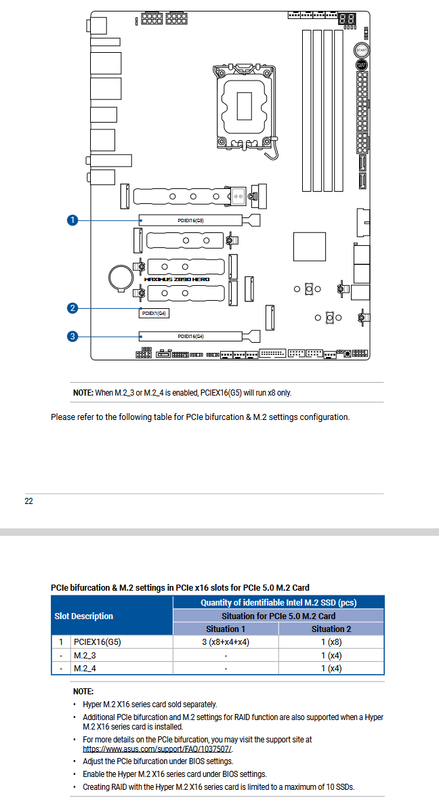
I recently built a new Intel Z890 system, and I'm a little confused on what speeds M2/PCIe slots will run at, and what would be my best configuration option.

Here's my motherboard manual showing layout and M2 settings:

https://i.postimg.cc/mZCnbc0L/Screenshot-2026-05-03-172830.png

I currently have a PCIe Gen5 M2 drive in the first slot below the CPU which I use as my Windows/boot drive. I have a 2nd SSD game connected via SATA ports which I use for games.

Currently, my GPU is running at x16. If I replace the SSD with a second PCIe Gen5 M2 drive in slot M2_3, will that then reduce my GPU to x8? Will it reduce the speeds of the M2 drives to Gen4 as well?

Am I best just leaving the 2nd drive as an SSD, or changing to a Gen5 M2 drive? Even if it did lower the GPU to x8, would it be noticeable?

I guess I'm trying to understand if x16 GPU + Gen5 M2+ SSD would be better than x8 GPU + 2 Gen5 M2s possibly running at Gen4 speeds.

u/draven33l — 10 days ago

The joystick and buttons are fine, but I've never been a fan of the screw on bat tops, and I think I want concave buttons for accuracy. I just took apart the control deck to see how it is wired. For those of you more knowledgeable and that have done joystick swaps on other home arcades, how does this look?

I'm thinking of going iL Eurojoysticks and Happ Competition buttons. Would this be a straight swap, or does it look like it would need a new wiring harness or anything else?

u/draven33l — 11 days ago

After many hours of building the cabinet, here are my thoughts on the good, bad, and ugly. The good definitely outweigh the bad, but after finishing the build, I had to give my thoughts. This will be a long read.

The Good:

  • EXCELLENT build quality. Every piece of wood is thick and solid. Easily the best home arcade unit I've ever built. Every box was well packaged with tons of support cardboard. I'm going to have to take a dumpster trip with how much cardboard I have to get rid of.
  • The artwork is great, and they fixed a lot of minor complaints from the prototype. The power button is now black and you can barely see it near the speakers. There's also yellow t-molding on the World Warrior cabinet, which is accurate to the arcade.
  • Huge marquee and easily the best looking home arcade marquee I've seen. It legit looks like a real marquee. And if you wanted to change out the marquee for some reason, you just take the top off, and slide it out. On a A1U, you'd have to take the sides off and it's a nightmare. That's how you do it.
  • The controls feel good, and it feels like I'm at a real SF2 cabinet. I was worried about the weird truck liner coating on the deck and thought it might feel rough or scratchy, but it's fine. Especially with the control panel being slanted, you don't really feel it much. It should feels like it should keep the deck protected.
  • There's no IconicArcade branding anywhere on the cabinet itself. It looks like an official Street Fighter cabinet
  • The Raspberry Pi has a heatsink and fan. I haven't tested it much yet, but they didn't cheap out with just a board.

The Bad:

  • This is honestly the biggest complaint. The instructions are awful and nearly worthless. I've built numerous Arcade1Up cabinets and other brands, and this was brain numbing. It will tell you to put numerous panels together while using 2 different types of screws. OK...Which screws for which panel? Welp...figure that out yourself. If you've built enough A1U cabinets, you'll probably figure it out, but it's a challenge. I can't imagine this being your first home cabinet and having to figure it out. It took me hours and I've built a bunch.
  • The cabinet is heavy. It's nearly 100lbs and awkwardly sized. You have to join the two pieces together at some point and it's nearly impossible to do with one person. I did it, but I scratched up some of the artwork on both sides. You can't really slide the pieces together, because if you try to lift it, it's not bolted together and is too top heavy. You really need two people, or put the monitor on a table and then try to carefully shimmy it over on top of the bottom. I know this is done for shipping, but the AtGames Legends for instance, the entire top monitor part was built, and you simply joined pieces. That's the gold standard to me.
  • The wiring is intense. I'm a tech guy, and the wiring diagram looks like a puzzle. The instructions just aren't clear. There are two types of power cables for the monitor and control panel. One has a ferrite core on it, and it doesn't tell you which one to use. I went with the monitor, but that might be wrong. It's honestly easier just to figure out where things go just by looking at the cables vs. the wiring diagram which will just confuse you.
  • It does still wobble just a little, but it's nowhere near as bad as Arcade1Ups. The AtGames Legends Ultimate is the still the king when it comes to not wobbling. I don't understand what they did different, because it doesn't wobble at all.
  • The convex buttons feel off to me. SF2 had concave, so part of me wants to change them out. Convex is better for button mashing and other games, but it's not accurate for Street Fighter II.
  • The monitor feels small. It's bigger than an Arcade1Up, but for the size of the cabinet, it feels like it should be bigger. The bezel takes up a lot of space. That said, the original SF2 had a 19" monitor, so it's accurate. Champion Edition was 25" though, and I think more of us are probably more familiar with that size.
  • One of my speaker grills was crushed out of the package. I was able to bend it back into shape a bit, but that still kinda irks me for a nearly $800 item. I get it though. There's so many parts, it's hard to get everything perfect. Everything else was in flawless condition.

--------------------------------------------

That about wraps it up for now. I haven't tested loaded another image on the Raspberry Pi yet. I do have an image ready to go though. My eventual goal was to use this cabinet as my multicade, so I'll report back when I can test it.

Edit 1: Welp, the Pi 5 works with other SD cards. One problem, is the monitor is technically a 16:9, but the games are set to run in 4x3. Someone might have to make a 4:3 build, but at least it works.

reddit.com
u/draven33l — 14 days ago