r/macapps

I built a free macOS menu bar app that shows live IPL / EPL scores - no browser needed

Problem:

Checking cricket or football scores during the day means constant browser tab-switching. There's no lightweight, native way to glance at a live score without breaking your flow.

Comparison:

- Mela / Fantastical sports widgets — require a separate window or Today widget; not persistent in the menu bar

- Browser tabs / ESPN app — heavy, ad-filled, demand full attention                                     

IPL Menu Bar and EPL Menu Bar sit silently in your menu bar and show the live score at a glance. Native Swift, notarized by Apple, no Electron.

Pricing:

Free — https://scorebar.app 

https://reddit.com/link/1scwqd0/video/fcohlkl3kbtg1/player

reddit.com
u/Embarrassed_Tour_679 — 4 hours ago
New in Offloader v1.3 — Scan your Mac, find wasted space, and auto-offload to iCloud
▲ 35 r/macapps

New in Offloader v1.3 — Scan your Mac, find wasted space, and auto-offload to iCloud

Offloader v1.3 just released today and brings a highly requested feature from r/macapps -> Scan & Report! See a breakdown of where the most space is being taken up on your Mac that can be offloaded to iCloud Drive -- then tell Offloader to send it up to the cloud and save space immediately.

I've also bunched in a number of bug fixes and general quality of life improvements.

I'll be handing out free Offloader promo codes to the best feature ideas below, cheers!

Problem: macOS can leave large iCloud Drive files stored locally for days or weeks, even when “Optimize Mac Storage” is enabled, causing your disk to fill up unexpectedly. Offloader solves this by proactively offloading unused files from your Mac while keeping them safely in iCloud, freeing space automatically without deleting anything.  

Comparison: Top alternatives include macOS built-in “Optimize Storage” and Terminal-based approaches like using brctl evict. These either run slowly, require manual steps, or offer limited control. Offloader is better because it adds scheduled scans, customizable delays, and drag-and-drop instant offloading — all in a lightweight background utility with no manual intervention.  

Price: $1.99 lifetime purchase.

https://apps.apple.com/us/app/offloader/id6749336975?mt=12

u/erm-7 — 14 hours ago
Image 1 — Backup & Restore apps Locally with no Migration Assistant needed
Image 2 — Backup & Restore apps Locally with no Migration Assistant needed
Image 3 — Backup & Restore apps Locally with no Migration Assistant needed
▲ 38 r/macapps

Backup & Restore apps Locally with no Migration Assistant needed

Say goodbye to slow and HUGE Time Machine backups and all the mess that comes with your old machine if using Migration Assistant when you just need your apps up and running..

Thats where i bring you AppStateKeeper a user friendly GUI-app that allows you to easilly save snapshots of an app/s and restore all in the same app! Fully-Local, No-Telemetry or Internet access.

Other solutions like Chezmoi/Mockup require you to use (and be comfortable with using the Terminal and commands to memorize in order to use effectively. were as AppStateSaver has a simple to use GUI interface with an easy to understand overview of your backups.

Example use 1: Skip the accumulated bloat of your old Mac and setup a new fresh Macos, use AppStateSaver for proper Time Machine-like restores capturing only necessary config/settings files without the bloat.

Example use 2: Keep many snapshots of an app (organized easy to view in the app) restore to that excact app state whenever on what ever machine.

Pricing 4eur lifetime license, possible to test out with two app restores (free tier)

Link: https://github.com/hreinssondev/AppStateSaver

About me (Tier 2 Transparency)

My name is Hlynur Hreinsson and ive been a hobby developer for about a year now. Mainly making solutions for my own problems but i thought this one might help out others too therefore sharing here. Im often re setting up my 2nd mac and need a fresh install each time and now ended up creating this solution im calling AppStateSaver. Does a proper app restore better than any "sync" function ive come accross. Requires system settings to be setup manually etc (for now atleast new feature in the works!) if using as setup tool on two Macs. Making it an even closer to a Migration Assistant alternative. Able to skip all the old bloat from the host machine.

Github: https://github.com/hreinssondev

Apple Developer ID: hreinssondev@gmail.com

Privacy policy: https://github.com/hreinssondev/AppStateSaver/blob/0da8576f84656235ae7c9ba3d333df4216363fd0/Privacy%20Policy

Terms & Conditions: https://github.com/hreinssondev/AppStateSaver/blob/0da8576f84656235ae7c9ba3d333df4216363fd0/Privacy%20Policy

u/DependentKey6405 — 16 hours ago
Is There an App Similar to "TypeItIn" for Windows PC?

Is There an App Similar to "TypeItIn" for Windows PC?

Is there an app that is similar to "TypeItIn" which I use in Windows PC?

It is basically to automate repetitive typing tasks by allowing users to create custom phases through clickable buttons for phrases, emails, passwords, and data.

No need to memorise countless abbreviations.

Here is the GIF showing you how it works.

https://i.redd.it/cnw8o23r0atg1.gif

reddit.com
u/nez329 — 9 hours ago
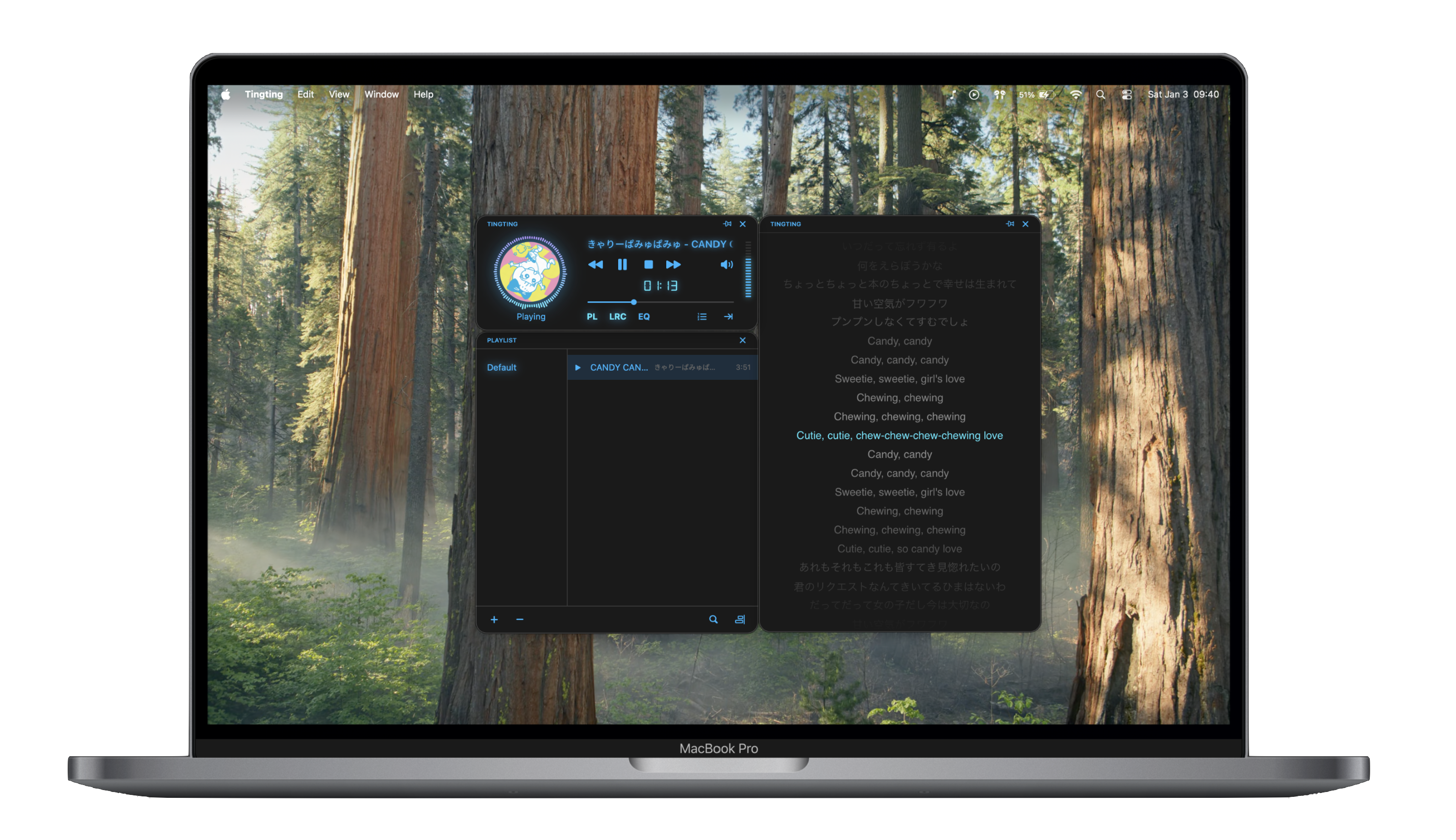
We built a native macOS music player focused on local files + lyrics — Tingting

We built a native macOS music player focused on local files + lyrics — Tingting

We got tired of not having a good home for local FLAC collections. Apple Music keeps pushing toward streaming, and VLC works but feels like a workaround.

So we spent a few months building our own: Tingting — a native macOS music player built with SwiftUI, designed specifically for local music libraries.

What it does:

  • Plays FLAC, ALAC, MP3, M4A, WAV — full lossless support via AVFoundation
  • Auto-fetches lyrics from open-source databases and saves them locally
  • Manual .lrc import via drag & drop
  • Native macOS window management — 4 independent windows (player, playlist, lyrics, equalizer)
  • 10-band equalizer (unlockable, $0.99 IAP)

App Store: https://apps.apple.com/us/app/tingting-player/id6756565155

Website: https://tingting.chainbow.co.jp/

Happy to hear feedback or bug reports — this is early days.

u/Worried-Judgment-106 — 10 hours ago

App Request: Screen Shot Organizer

Is there a screen shot organizer that can organize screen shots, but is smart enough to know when something is a screen shot regardless of the location on your computer?

reddit.com
u/Latter_Pen2421 — 20 hours ago
I turned my Mac into a private AI workstation (chat, images, video, all offline) – Walkthrough

I turned my Mac into a private AI workstation (chat, images, video, all offline) – Walkthrough

Hello r/macapps!

Shubi here – I’ve been building a fully on-device AI app for Mac, and I just shipped a major Lekh AI Pro update. This community has been huge in shaping the product, so I’d love your feedback on what to build next. Attached is a walkthrough video of how the app works.

This release is packed – here’s what’s inside now:

  • Chat with local models (MLX, GGUF, JANG – LLaMA, Qwen, Gemma, Mistral, DeepSeek, etc.)
  • Vision models (analyze images)
  • Image generation + editing (Flux, Qwen Image Edit,SDXL, inpainting, object removal, colorization)
  • 4x Upscaling
  • NEW: LTX-2.3 video generation (fully local)
  • Text-to-Speech (Kokoro + Qwen3 TTS + MOSS TTS, fully offline)
  • Memory / RAG (Knowledge Hub) – chat with your own files & data
  • Memory Sync – keep context across chats
  • Local AI Server (OpenAI-compatible, runs on your Mac)
  • Performance upgrades (turboquant, faster MLX inference)
  • Bring your own models (GGUF, MLX, JANG support)
  • Benchmarking capabilities
  • Tons of bug fixes + chat improvements
  • EDIT: Added support for Gemma 4 and Bonsai 8B
  • EDIT: It also has open router integration so you can chat with cloud models too.
  • EDIT: Forgot to include that if you bought the base ios version for 4.99 before March 14 2026, you get Pro for free. Please dm me a screenshot of the receipt and I'll share a license key asap.

Everything runs fully on-device – no APIs, no subscriptions, no data leaving your Mac.

Problem: Most AI tools depend on cloud APIs, subscriptions, and sending your data externally. That adds cost, latency, and privacy concerns. There’s still no single tool that brings everything local into one place.

Solution: Lekh AI Pro runs chat, vision, image generation, editing, TTS, memory (RAG), and even video generation entirely on your Mac – unified, private, and optimized for Apple Silicon.

Comparison: Ollama + OpenWebUI are great for local chat, but require setup and are fragmented across tools. This is a fully integrated native macOS app – no config, no terminals – just install and run everything locally.

Price: $9.99 one-time (Pro)

https://lekhai.app/pro

Direct download (advanced features not allowed in App Store due to sandbox limits)

youtube.com
u/Living_Commercial_10 — 22 hours ago
Outpost Launcher v1.3 now includes stock tickers, drag-and-drop reordering and...your next idea! Promo codes below for the best ideas.

Outpost Launcher v1.3 now includes stock tickers, drag-and-drop reordering and...your next idea! Promo codes below for the best ideas.

Hello again r/macapps! Eric, dev for Outpost Launcher here. I've just wrapped up a nice v1.3 release, and since this community was so key in helping crowd-dev the v1 release , I wanted to see what are the top requests for the next set of features?

Already included is Market Watch, which lets you include stock/index tickers with beautiful spark lines to Outpost, as well as easy drag-and-drop reordering.

I've also bunched in a number of bug fixes and general quality of life improvements.

Shoot me your best suggestion and I'll get you a promo code to redeem for a free copy of Outpost. Happy Thursday!

I'll be handing out free Outpost promo codes to the best feature ideas below, cheers!

Problem: Many macOS workflows require constant context-switching — opening Finder, dragging files, navigating folders, and launching apps just to move or act on something. Outpost Launcher solves this by putting a cursor-centered drag-and-launch palette directly under your pointer, letting you drop files, text, or links onto apps, contacts, folders, or scripts instantly without switching windows.  

Comparison: Top alternatives include Raycast and Alfred. Both are powerful keyboard-driven launchers focused on search and command execution. Outpost is different because it’s drag-and-drop-first, cursor-centered, and optimized for quickly moving files and triggering actions visually — no typing, no command memorization, and minimal setup.

Price: $3,99 lifetime purchase.
https://apps.apple.com/us/app/outpost-launcher/id6749519388?mt=12

u/erm-7 — 22 hours ago
Week