Best "low or no PWM" televisions; What do you use? (Plasma, HDTV, CRT, OLED, 4KTV, etc)
Any recommendations? Ty :)
u/CounselMe2Day — 4 days ago
Any recommendations? Ty :)
This sub is a great resource but it can be difficult to search through with so many people being sensitive to different things and having different thresholds of tolerance. A pinned megathread could offer a convenient way to keep a log of people's experiences.
I bought a cheap (£5) "Anti-Blue Light Hydrogel Screen Protector" via eBay, not expecting anything. Surprisingly, the screen does possibly feel a little more comfortable than it did without it (although my tolerance may have shifted). It makes it massively more reflective, of course...
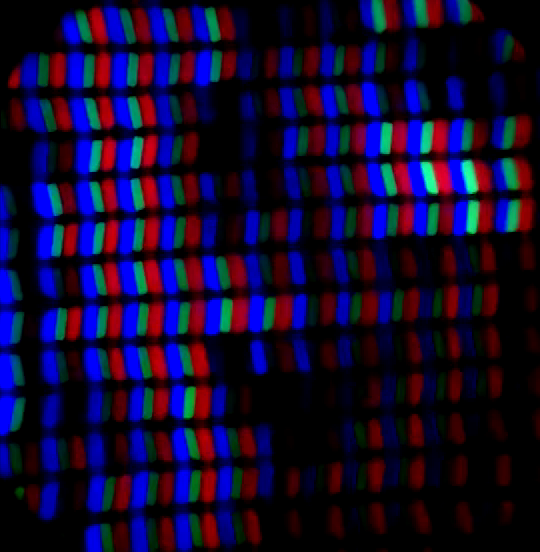
But the bigger surprise: it made the sub-pixel structure crystal clear! Compared to without, shown in my review... This indicates the "nano etched" matte surface finish is the only thing obstructing the view. I had the impression there should be more going on under the surface, but the information about a "Middle Layer: Diffuse Reflection" in the version 3 screen whitepaper is omitted in version 4's. And this is my first TCL product, so I've no feel for any changes in appearance.
The upshot is that we can clearly spot any temporal dithering going on (YouTube version of above as a backup)... But I actually struggled to find any TD in the usual places: home screen icon text, gradients, including Lagom test page (in image below), or NXTpaper modes (surprisingly)... But it is definitely there in HDR YouTube videos (eg "COSTA RICA IN 4K 60fps HDR") and performing an absolute disco on the settings page test image (below):
A problem is that I have previously used ADB commands to try to disable HDR capabilities (and so TD). I think I re-enabled this (back to default) upon retesting, previously. But I couldn't be sure then (or now) if I've changed something that will reduce TD. And don't have the time to fiddle with it a 3rd time. u/NSutrich has done similar and reported similar observations. But I'd appreciate anyone else, with a 'clean' new phone, confirming what they see, too. Using a suitable screen protector - hydrogel may be more clearly visible than glass, conforming to the surface texture better.
Example of the lack of obvious dithering (below and on YouTube). There are possibly slight fluctuations of the half-dimmed green sub-pixels, on the long edge of the "r". Which I wouldn't know enough to distinguish between TD, text anti-aliasing or pixel inversion..? There are, however, little black splotch flashes, kind of like film grain. I wondered if they are camera sensor noise..? But I've not noticed them elsewhere. So maybe some phenomenon with the backlight? They don't appear to align well with sub-pixels, although they are more visible on red ones, at the ends (some inversion artifact?).
Example of a lack of clear TD on lettering. But clear black flashes all over.
Bonus screen protector filtering evaluation: I had a go at making a precise measurement of the colour spectrum of the screen, before and after, using my cheap spectroscope. By locking my camera to the exact same Pro mode settings and measuring the same part of the screen, etc, I measured a possible blue colour intensity reduction of about 5% (relative to the red and green intensity changes). But I guestimate the potential error in my measurement to be as big as this value. So not significant. And directly overlaying (and subtracting) the 'before' and 'with protector' spectrum photos showed total black, so no notable difference between them.
Top: screenshot of phone taking the spectrum photo. Bottom: Affinity photo comparison.
Hence I'd say the blue light blocking of the screen is wishful thinking, at best (perhaps block some UV, who knows). So any change in comfort is more likely from the crisper screen appearance. It feels nicer to my finger tips. Looks better used indoors, in dim lighting. But it hopeless outside; the worse of both worlds, being reflective and less bright than contemporary OLEDs.
tl;dr: cheap blue-light screen filter doesn't work as intended, but may help those who suffered from the blurriness of this screen finish. But reflections are far worse. Handy trick for testing other devices with a matte finish obscuring the pixel structure. TCL 60 Ultra shows minimal temporal dithering in most everyday contexts.
Edit 2026-05-10: fixed images broken by delayed Reddit bug. Minor text tweaks.
Hey all! Apple debuted the (hopefully first generation of) it's PWM accessibility toggle six months ago with the iPhone 17 line. It didn't do exactly what many were hoping for, but it did change some things, and I'm wondering how many people in this community are still able to use any iPhone 17 model today.
I've got the 17 Pro Max and only find it comfortable at 100% brightness with reduce white point enabled. Since I can't comfortably reduce the brightness without discomfort, the PWM disable toggle doesn't help me at all. Has anyone else has the same experience, or something entirely different?
I know iPhones aren’t typically the best but I am not a fan of Android at the moment. Any recommendations for the best iPhone in the last 5 years that’s easy on the head and eyes for Screen + PWM Sensitive Folk ? Thanks so much!
I posted in another forum and recieved no replies so I'm wondering if I'm so sensitive only my eyes can see it. This is under a microscope slow mo 240 fps dell g2724d win 10 intel iris xe
Hey y'all - just wanted to share this in case anyone out there needs it, too!
I get really, really overwhelmed by the constant visual motion + clutter of the internet these days, but also have to spend a lot of time there, on various sites (like Pinterest for client mood boards, etc).
My main enemy is GIFS (grrrrr, *gnashes teeth* I hate them I hate them) and looping ads, and I felt like the ad blockers I installed were honestly ineffective & I was losing my GD mind every day. Like, why da fuck am I having to regulate every 20 mins, ya know? Anyway.
I figured out a lil' work around and wanted to share it here if y'all need it! I have an Apple ecosystem & use Safari as my main browser (don't @ me, I'm a creature of habit), so this might need some translation for Windows / Linux peeps. I've attached some reference screenshots for the steps below, too! But:
1. Open TextEdit and create a new file.
2. Paste this small code block in that file (this blocks all gifs, ads, and specifically looping "sponsored" shit on Pinterest, but I also included the catch word "Promoted" as well because I was anger, grrr.):
/* 1. Hide the actual video/GIF players on Pinterest */
div[data-test-id="visual-content-container"] video { display: none !important; }
/* 2. Hide pins labeled Sponsored or Promoted */
div[data-grid-item]:has([aria-label*="Sponsored"]),
div[data-grid-item]:has([aria-label*="Promoted"]) { display: none !important; }
/* 3. Hide any leftover Sponsored/Promoted text labels */
[data-test-id="sponsored-label"],
[data-test-id="promoted-label"] { display: none !important; }
3. Make sure this file is "Plain Text Format" (shift+command+A --> shift+command+T OR Format --> make plain text). It should look like this:
4. Save this file: when the "save" box opens, deselect the box that says "add .txt extension" or whatever. Delete the file name (probably "Untitled.txt") and replace it with "block_gifs.css". Or, call it whatever you what ("shut_up_world.css" etc) but make sure the file name ends in .css (this edits the style of sites.)
5. Open Safari --> settings --> Advanced ---> Make sure the box at the bottom "show features for web developers" is selected ---> click the dropdown box in "Style Sheet" and select "other" --> upload your "block_gifs.css" file here. It should look like this:
You might have to refresh your browser (quit Safari & reopen), but... Ta-da! Looping gifs & ads should now be blocked, specifically on sites like Pinterest.
Hope this quiets the visual noise for any of my WFH AuDHD gals out there 😄 Holler if I can help with anything more specific in the comments, too!
I have a Thinkpad P14s Gen 6 with IPS screen. The weird think is that I can better use it at full or close to full brightness. If I reduce brightness it gets harder and harder to use. The notebook is said to not use PWM even in lower brightness settings. So this should not be the issue here. The colors are generally very oversaturated and I use an app to reduce saturation.
The reduction in brightness looks like there are gray layers put on top of the screen. It just gets duller and duller. Same with night light settings. It does not alter the colors but puts a layer of yellow on top.
Does this description sound familiar to someone?
I use incadescent lightbulbs and the room is generally darker. So I would normally not use full brightness.
No one believes this user that win 11 could be causing him issues and are even asking if he sleeps enough etc. It makes me so sad that people are just so unaware of the flicker issues
I created a visualization of how many OLEDs actually flicker and use PWM: https://www.sundiallabs.tech/pages/oled-flicker
I made this because I was inspired by a post by u/NoFlickerPhone, who made a great PWM simulation webpage. The goal of my page is to explain how and why OLEDs flicker, and also describe how to properly measure OLED flicker. I've been doing lots of flicker measurements on OLEDs lately, and it can be confusing to get right. I've also seen lots of PWM test results on OLEDs that were not done completely correctly and end up underestimating the flicker depth. Incorrect results are especially common to see at high / moderate brightness.
The first visualization shows how the dimming works on mobile OLEDs, specifically modeled after the iPhone 17 Super Retina XDR OLED. It appears to use DC-dimming for some of the brightness range, then switch to PWM. This is done because most OLEDs can only be DC-dimmed to a certain point.
The second visualization explains why OLEDs need to be measured carefully. The basic idea is that if your measurement device is detecting light from multiple rows, the waveform will be "smeared" or averaged and the flicker will look less bad than it actually is. This averaging isn't what our eyes do (they form an image of the screen which preserves the flicker pattern). So ideally, we need to be measuring the flicker from a single row (or only a few adjacent rows).
When I was younger, CRTs (Cathode Ray Tube display) and plasmas (Plasma display panel) never bothered me at all, but modern screens feel awful by comparison.
A big part of it seems to be how these displays handle light over time. With CRTs and plasmas, the image isn’t just “on” or “off.” The phosphors light up and then fade gradually, so even though they’re technically flickering, it feels smooth and continuous. It’s not a harsh, digital transition—it has a kind of natural softness to it.
Modern displays—especially LED-backlit LCDs (LED-backlit LCD display) and OLED (OLED display)—feel totally different. The light output is much more abrupt. You’ve got things like Pulse-width modulation (PWM) dimming, where the light is rapidly switching on and off, plus stuff like pixel inversion happening constantly in the background. Even if you can’t “see” it directly, it makes the image feel less stable.
I also think the backlight itself plays a big role. Older CCFL-backlit LCDs (CCFL backlight) always felt easier on my eyes. The light just seemed softer and less intense overall. Modern LED backlights are super bright and react instantly, and I think that makes all the underlying LCD behavior—like inversion and other tiny fluctuations—stand out way more. Instead of being kind of hidden, it feels sharper and more noticeable.
There’s also the pixel structure. CRTs and plasmas didn’t have that perfectly rigid, razor-sharp grid. Everything was a bit more blended and forgiving. Modern displays are insanely sharp, which is great on paper, but combined with all the constant micro-changes going on, it can feel kind of harsh.
So it feels like we traded a more smooth, natural-looking image for one that’s super sharp but constantly switching under the hood.
Curious if anyone else who used CRTs or plasmas feels the same way.
Anybody using s native 10 bit monitor with Windows 11 and is successful in eliminating eyestrain/headaches this way? It should in theory take away all dithering a if it’s also pwm free there should be no more flicker. I am starting too see some nat 10 bit LCD monitors that are kinda affordable and I am wondering if this is the solution for now
I’m not very knowledgeable about monitor technology or eye-comfort features.
Right now I use an AOC G2590PX (TN panel) and compared with the other monitors I have at home that are IPS panels, it seems to be the one that strains my eyes the least.
I need to buy two more monitors and would like to test models that might feel even better than my G2590PX.
Can anyone suggest some budget monitors that are considered good for people with sensitive eyes, preferably non-IPS?
I won’t use them for gaming.
TL;DR: I need recommendations for older, budget-friendly, non-IPS monitors that check all the criteria for not being bad for sensitive eyes.
Anybody here using moto oleds that can provide feedback?I know that a lot of them have the flicker reduction setting, but I haven't had a ton of success with it.
As title says,is there any app like stillcolor (Macos) to stop dithering on iPados, especially ios 26 updates have been really hurting my eyes..
Has anyone else had issues finding eye care monitors that are not absolutely humongous? Other then having a gaming oriented monitor, I think its the 24 inch size that might be killing my eyes. Do anyone else think screen size can contribute to strain? Or would a good monitor be fine at any size without flicker etc?