r/StealthRemoteWork
i wrote code for deploying vpn
In this post we will build our own secure VPN server to connect to it from anywhere in the world and mimic our own home address. The goal is to virtually take our home IP everywhere we go. As a bonus we will also be able to connect to our home LAN network from anywhere in the world allowing us to control printers, NAS servers, cameras, etc.
The Hardware:
- OpenWrt compatible router with enough RAM (>8mb), Storage (>16mb) and CPU power (>580mhz)
- 2x Ethernet cables
- a PC with Ethernet port or USB to Ethernet Adapter
- Internet connection
- A mini UPS in case power goes down (It's crucial the router stays on all the time)
The Software:
- Linux / Windows
- This script from Flashed Router GitHub repo
The Steps:
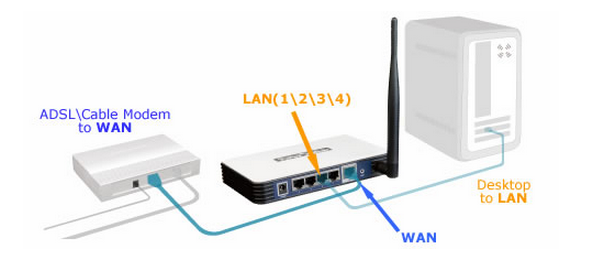
- Connect PC to Router via the Ethernet cable
- Router's LAN → PC
- Router's WAN → ISP modem LAN - see this picture for an example
- Reflash your device with OpenWrt. You can find step by step guide on their wiki pages: https://openwrt.org/toh
- Once you have OpenWrt installed ssh into it using your command prompt
ssh root@openwrt.lan
- You should get an output like this:
  _______                     ________        __
 |       |.-----.-----.-----.|  |  |  |.----.|  |_
 |   -   ||  _  |  -__|     ||  |  |  ||   _||   _|
 |_______||   __|_____|__|__||________||__|  |____|
          |__| W I R E L E S S   F R E E D O M
 -----------------------------------------------------


root@openwrt:~#
- Then run this command within the new shell session:
# for some reason reddit is blocking this - the command will be on the github page I shared.
Note: FlashedRouter.com were kind enough to share their home tunnel script which they use for their own plug and play devices which create the home tunnel we are trying to build in this post. You can browse their code and inspect every line in their GitHub: github.com/FlashedRouter/home-tunnel
- The script will run multiple commands to deploy the server and output the final Wireguard VPN server config file also found under
/root/wg-client.conf, which you will need to connect back to your home server from anywhere in the world. It will look something like this:
root@homeServer:~# cat wg-client.conf
[Interface]
PrivateKey = 0G………………………..w0I=
Address = 192.168.9.2/32
ListenPort = 51820
DNS = 94.140.14.14, 94.140.15.15

[Peer]
PublicKey = OZZ…………………….…dTk=
PresharedKey = Ho…………………….Gk=
Endpoint = 192.168.88.1:51820
AllowedIPs = 0.0.0.0/0, ::/0
You will also need to forward the wireguard port (udp: 51820) on your ISP modem. This will depend on your ISP modem but a google search will lead you to the correct guide. Here is an example: noip.com/support/knowledgebase/general-port-forwarding-guide
You might also need a dynamic IP to static domain name service like dyns.cx/ to get your IP if it changes with every reboot.
You're ready for testing now. Just copy the
wg-client.conffile contents into your Wireguard and click connect.If you use it from your phone, switch data on and your
I understand some steps are a bit vague, if you have any questions - AMA in the comments. I also would like to recommend looking into a plug and play solution: called keepmyhomeip.com where no port forwarding or static IP are required.
Ps: report bugs and improve code at the same github repo.
u/FreedomRouters — 1 month ago
I created a tunneling device to mimic a local home network from anywhere in the world. Useful for remote work and digital nomads.
I have been working on something, and I think it has the potential to be useful to other digital nomads and remote workers.
The Problem:
Have you ever tried to access your home bank, streaming services, government websites, tax, or work resources while traveling abroad, just to get a lovely message saying it's not available in your region? Or, worse, have you ever been marked as a suspicious login attempt because you're trying to access your resources while working remotely from a coffee shop in Bali?
The Solution:
I have created a device that will allow your internet connection to be tunneled through your home network instead of a data center. This will allow you to access your resources, such as your bank, streaming services, tax, work resources, etc., because it will appear that your internet is coming from your home network.
Why is it Different?
- Much harder to detect/block than a VPN
- Allows access to your bank, streaming services, tax, work resources, etc.
- More reliable than switching between VPN servers
- Built by people who need to work remotely
- It's a hardware solution, so no software is required to be installed at all!
Who is it for?
- Digital nomads sick of region locking
- Remote workers who need to get to region-locked tools and services
- Anyone who's been locked out of their own stuff while traveling
ps: We have experience with building VPN tools. So this version is built on top of our old product, and I'm looking to get feedback. Would something like this help you? What features would you want to see?
u/FreedomRouters — 1 month ago
My employer flagged my location while working abroad - here's what happened and how I fixed it
This post is not for: skeptics, paranoids, and people who work in extremely sensitive jobs.
It's a true story: My employer flagged me while travelling and working remotely. HR was called and I found myself in troubles so I promised myself to do it better next time.
I work in cyber security so I know the tools we used to flag people using VPN - so public VPN was quickly ruled out. Instead I used cloud VPS to roll my own VPN server. Checked its IP against public reputation data base like ipapi.is/ to make sure I'm not flagged as VPN.
To roll my own VPN server I deployed wireguard docker and run it - it's very simple and takes only few seconds. I'm technical enough to handle that. Quick google search for Docker Wireguard will lead you to it.
Finally I made sure my config is kill switch enabled, and tested against DNS leaks. I will post the config file later which I used to config my openwrt router.
To go extra layer of security I bought a USB-C to Ethernet adapter and disabled my Wi-Fi completely. Now I was able to always get internet from my VPN router directly without needing any software or extra steps.
ps: sorry for the typos I will edit later.
u/InsideNo6575 — 1 month ago
I wrote a script that allows me to take my home IP anywhere in the world. Free forever, no subscriptions
github.comu/FreedomRouters — 1 month ago
[ Removed by Reddit ]
[ Removed by Reddit on account of violating the content policy. ]
u/FreedomRouters — 1 month ago
We made a hardware tunnel that keeps your home residential IP intact while traveling - no config, no datacenter IPs
We built a hardware tunnel that preserves your residential IP at home when you're on the go – no config required, no data center IPs
It's two devices: our home server unit and our TravelMate. They work together to create an encrypted tunnel that sends all your traffic through your home IP
Plug and play – no port forwarding, no config required
Use case: remote employees living abroad that need stable IP for work tools, contractors with location constraints, or anyone that hates when VPNs get your IP blacklisted
Early adopter discount available 20% off for promocode REDDIT
Learn more at keepmyhomeip.com. AMA
u/FreedomRouters — 1 month ago
How to Work Remotely without Telling Your Employer - The safe way - in 2026
u/FreedomRouters — 1 month ago