Bambu labs threatened to send this developer to prison, so I'm hosting his code instead
youtube.comu/Veastli — 1 day ago
Hey all,
I got tired of the official Bambu Handy app requiring a cloud account to do things that never needed to leave my house, so I built a local-only Android companion app for my P1S.
BambuMobile: It connects directly to your printer over LAN using MQTT on port 8883 and the camera stream on port 6000. No Bambu cloud. No account. No data leaving your network. Works the same way OrcaSlicer and the other community tools do.
What it does:
On right to repair:
You paid $700+ for a printer. The MQTT broker is on the printer. The camera stream is on the printer. None of it needs the internet. But the official app routes it through Bambu's servers anyway. Projects like OpenBambuAPI document these protocols so that community tools can exist independent of whatever Bambu decides to do with their cloud, their ToS, or their business model in the future. That's worth building for.
Disclaimer:
Yes it was vibe coded. With Claude. Please don't come whining about it. It's open source so you can go and fix it if you want. I don't write Rust.
The app works great on my P1S. If someone can test it on a P1P, X1C, or A1 that'd be excellent. Don't @ me about code quality.
Built with Tauri v2 (Rust backend) + React/TypeScript. Licensed AGPL-3.0 so you can fork it, but keep it open.
GitHub: https://github.com/joel-sgc/BambuMobile
Roadmap has multiple printer support and some kind of print file browsing. We'll see what's possible on the protocol side.
Finally it's here and it's working. Thanks to great work of Alexey Cluster!
So here is the source: https://github.com/ClusterM/open-bambu-networking
And I've compiled it for Orca Slicer 2.3.2 and above (tested on dev build 2.4.0): https://github.com/Lojza007/open-bambu-networking/releases
It works with Alexey P2S and mine P1S. Now you can access files on printer and time lapses too. And I hope it'll be soon included in Orca Slicer.
If you want to compile by your self you need:
- GIT: https://github.com/git-for-windows/git/releases/tag/v2.54.0.windows.1
- Visual Studio 2019 Community Edition: https://aka.ms/vs/16/release/vs_community.exe (and select Desktop development with C++)
- VCPKG: https://github.com/microsoft/vcpkg (and after clone execute bootstrap-vcpkg.bat)
And then you need to open Developer PowerShell for VS 2019 and execute:
$env:VCPKG_ROOT = "C:\path\to\vcpkg"
.\configure.ps1 -ClientType orca_slicer
cmake --build   build --config Release
cmake --install build --config Release
I forked OrcaSlicer, developed changes, and tested them under Linux to allow users to slice, print, and view the camera with Bambu printers in cloud mode. By cloud mode I mean normal mode, not LAN mode or Developer mode.
It uses the latest version of the Bambu networking plugin, 02.06.00.50.
Repo:
https://github.com/malleaklea/OrcaSlicer
Instructions:
https://github.com/malleaklea/OrcaSlicer/blob/main/INSTRUCTIONS.md
I am working on getting Openbu into the Google Play Store. It is a replacement for Bambu Handy and Lanbu, and has been around for three months.
I need your help. Google has requirements of 20 testers before they will publish a new app to the store. Please DM me your Google Play Store account's email address, aka the Google account email address you logged into your Android device with and use with the Google Play Store. After I add it you can use this link.
The goal with getting it into the Google Play Store is to reach a wider audience. It is Open Source, and free. It will be staying free.
Screenshots of Openbu can be found here.
If you aren't interested in being test it for entry from the Google Play Store you can also just download the apk from here.
Features:
Edit: 1 tester enrolled, and 19 more to go.
I just installed my new BMCU370c with 4 dry boxes setup hoping I would be able to keep the spools in without needing to store them in a sealed bag every time I finish printing.
I sealed the upper lid with silicone but when pressing the box I do notice some air flow from the ptfe tube on the bmcu side.
I put some silica gel and I noticed it absorbed some moister in 2 days and turned pink.
Should I keep the spools in the dry boxes or will it ruin them?
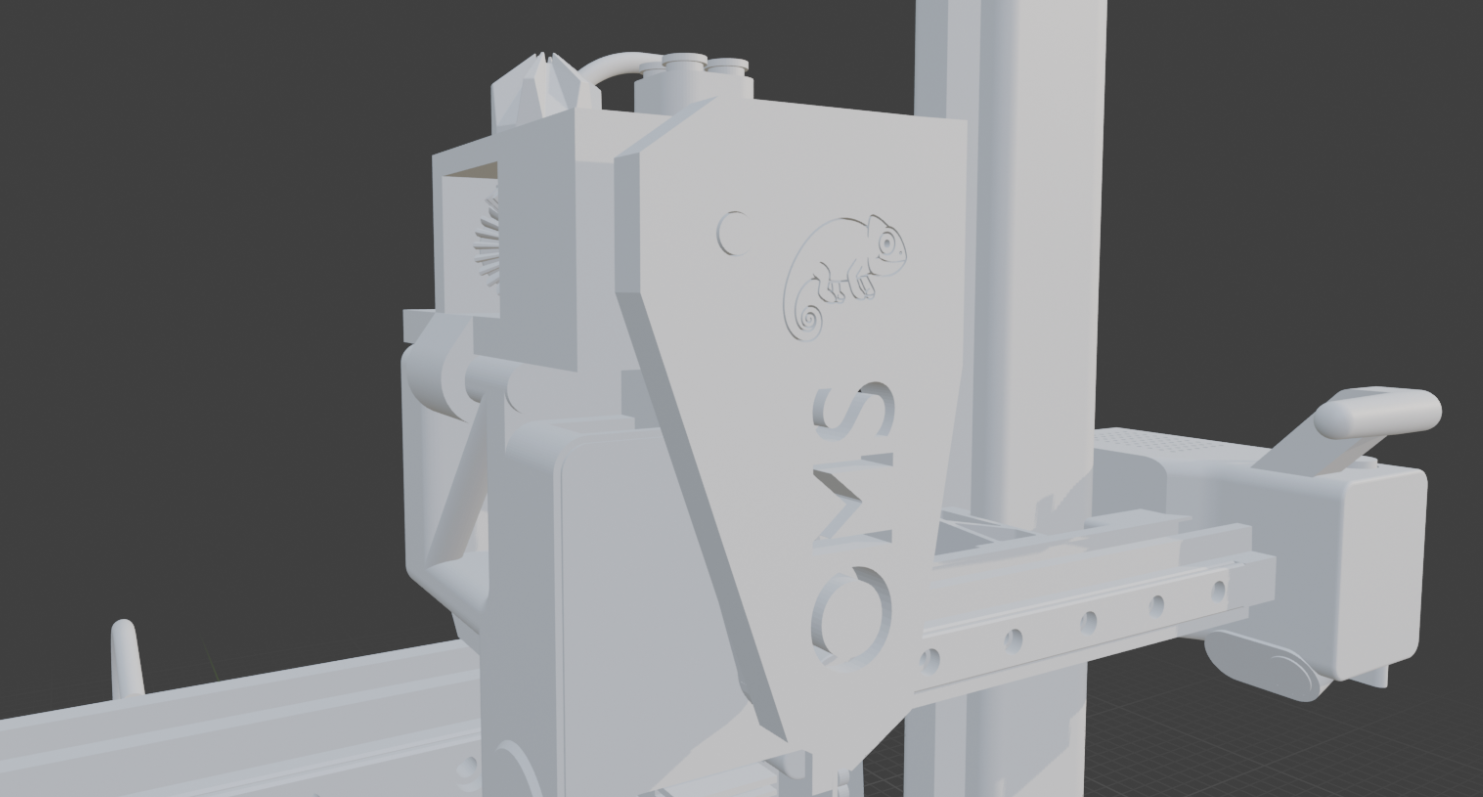
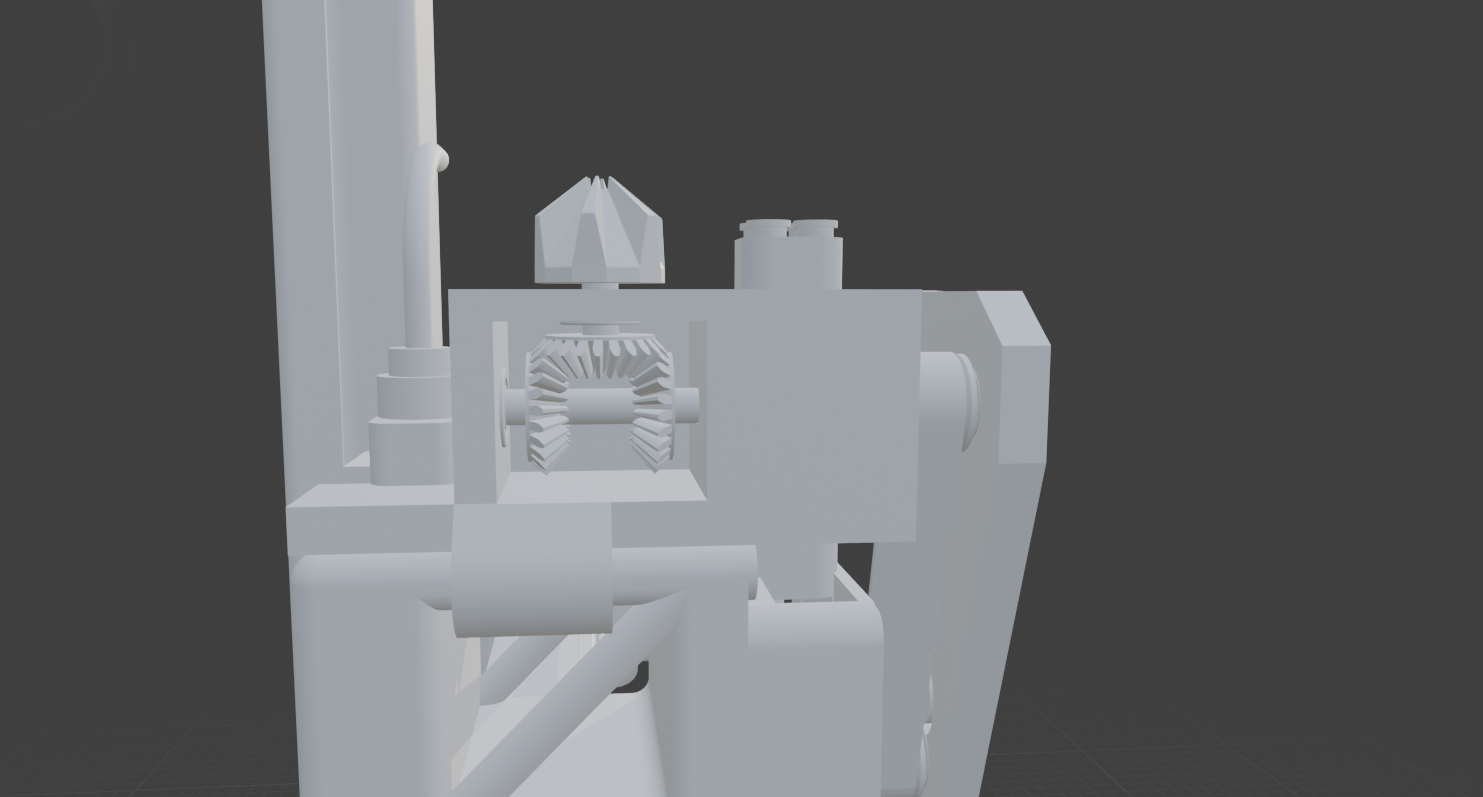
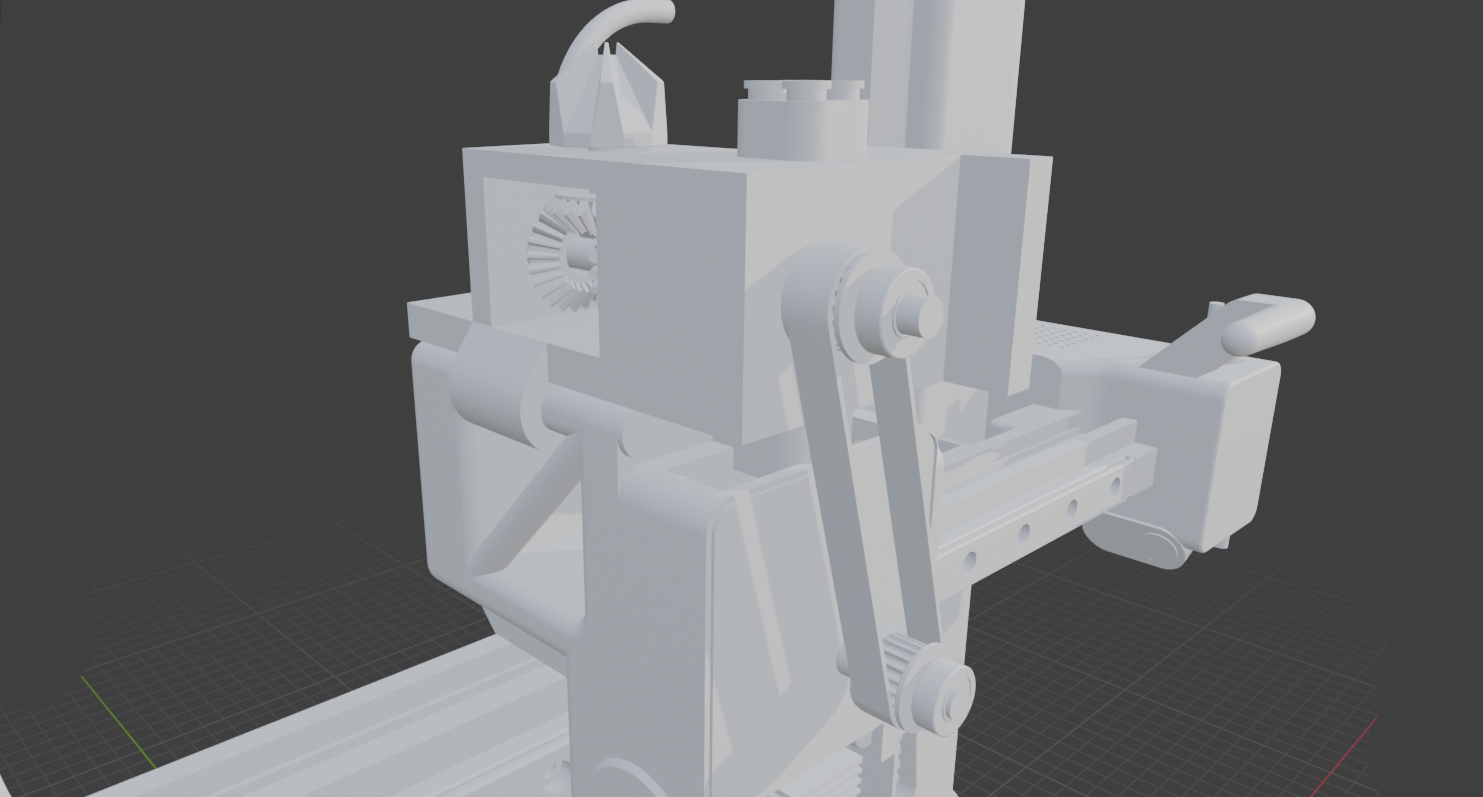
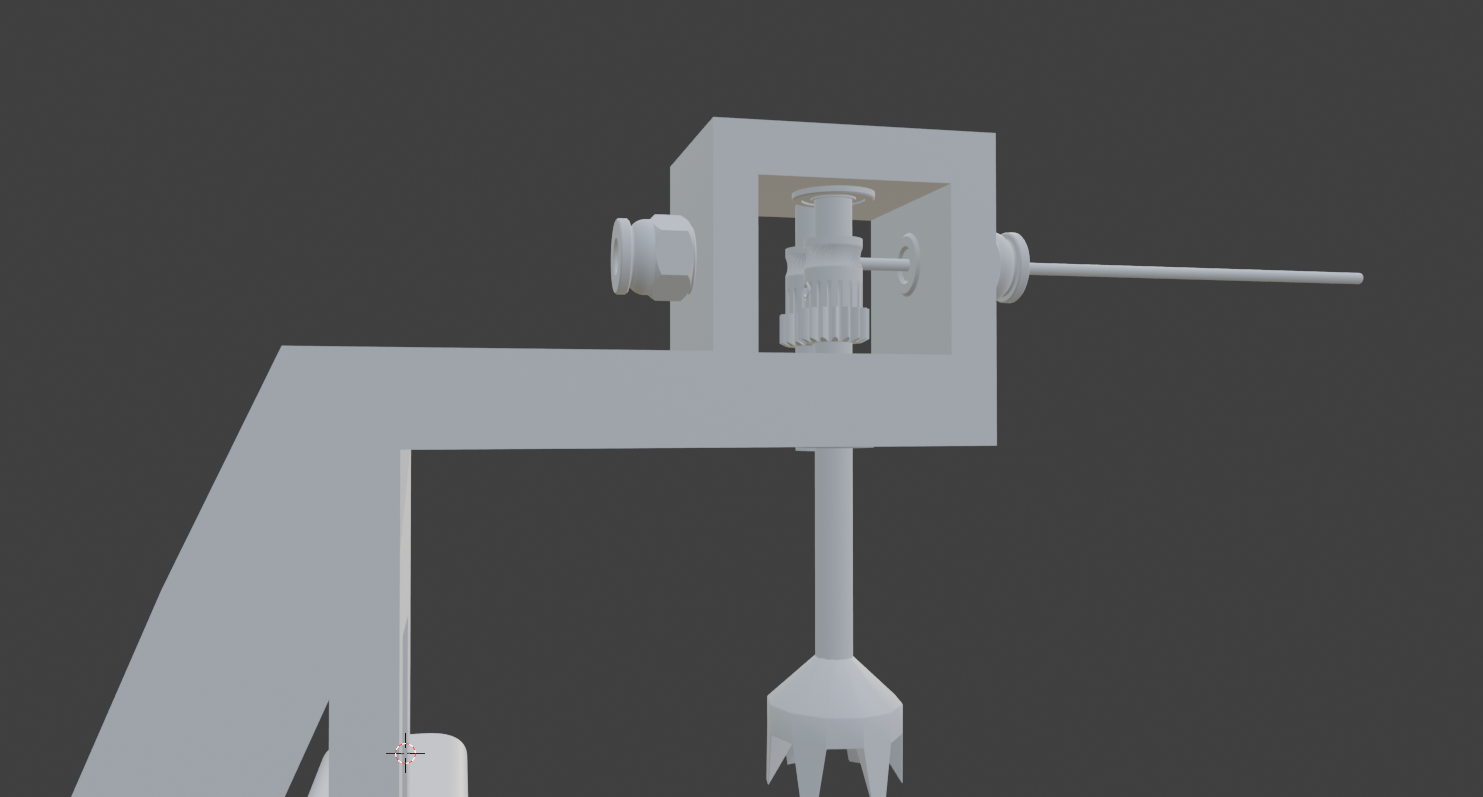
OpenMech Swapper (OMS) 🔄
The Open-Source, Fully Mechanical Multi-Filament System for Bambu Lab A1 Series
OpenMech Swapper (OMS) is a high-performance, 100% mechanical filament switching system. It is designed to bring multi-material capabilities to the Bambu Lab A1 and A1 Mini without the need for extra motors, sensors, or complex electronics.
💡 Origin & Credits
This project is an Open Source evolutioninspired by the brilliant mechanical concept of MechAMS created by Sipers Mechatronics.
While the original idea proved that a fully 3D-printable mechanical AMS was possible, OMS aims to make this technology accessible to everyone under an open-source license, incorporating community-driven improvements for better durability and precision.
✨ Key Features
Purely Mechanical: Driven by your toolhead position and the existing extruder motor.
GT2 Belt Drive: Upgraded from friction bands to standard 6mm GT2 timing belts for zero-slip and high-torque transmission.
Magnetic Indexing: Uses embedded Neodymium magnets (4x2mm) to create precise "detents," ensuring perfect alignment of the filament slots with zero mechanical wear.
Zero Electronics: No cables, no PCB, no extra steppers.
Non-Destructive: Quick installation that keeps your printer's warranty intact.
🛠 Improvements over the Concept
Reliability: By using GT2 belts, we eliminate the stretching issues of printed TPU bands.
Precision: The "Magnetic Snap" system ensures the indexing gear stays locked in the correct position even during high-speed printing.
Accessibility: All files (STEP/STL) are open for the community to remix and adapt to other printers.
📂 Compatibility
Hardware: Bambu Lab A1 & A1 Mini.
Software: Custom G-Code presets for Bambu Studio and Orca Slicer.
🔧 Hardware Requirements (BOM)
Main Body: Printed in PETG or PLA.
Drive System: 1x GT2 Timing Belt (6mm width).
Indexing: 4x2mm Neodymium Magnets (N52 recommended).
Path: Standard 4mm OD PTFE Tube.
🚀 Status: Prototyping
A1 Hardware almost done
A1 Mini Hardware:
Firmware initiating test.
🖼️** Víde**o
🤝 Contributing & License
We welcome all contributions! Whether it's optimizing G-Code macros or refining the mechanical tolerances.
So this place semi near me, is selling a AMS light dupe that connects to the printer. I’m a little scared that within the next couple of months they’re going to send an update that makes it so I can’t use this set up anymore. I wanna know if this is something that I should consider or if I should just not get it
Hey guys, I'm not super tech savvy when it comes to 3d printers, and I could use some help understanding my options.
I own a p1s with an AMS 2 on the latest firmware
It's connected to the internet using a Netgear wifi extender. So, technically, it's not on the same wifi as my PC I guess ?, and with no Ethernet available because too far from my PC.
I would like to use my p1S locally only because bambulab is pissing on my nerves. I just can't seem to make orcaslicer work on windows or Linux with my printer (it never finds it or just has a botched connection with no control, no camera feed...). It's been like that for a while but I decided to do something because it's a hassle.
What is currently the easiest option available to me ? Without extra hardware ? And as much as possible while keeping core functionalities, like access to the camera feed, control of the p1s fan, temp, etc, AND have my AMS system detected, working properly without loosing current spools everytime. Also, is there a simple way to check the camera while I'm home using an android or iOS app ?
Yup that's a lot 😅
I hope it still is possible and reasonable, I'd like to avoid super complex stuff with a rasperry pi, Dockers etc. It's too complex for my feeble mind 😞
Hi,
to begin with: i dont know how to code. I used Claude and Gemini for everything. I wanted to create a small program that allows me to stream my P2S and A1 Mini Video Streams and Stats at the same time.
The P2S is working fine via rtsps://{PRINTER_IP}:322/streaming/live/1 But i can´t get the A1 mini video stream working...
As i found out via https://github.com/Doridian/OpenBambuAPI/blob/main/video.md , the A1 mini doesnt work via a RTSP Server and uses another port.
I also used go2rtc and ha-bambulab as inspiration for the AI, but the stream still doesnt work.
from tkinter import ttk, messagebox
import cv2
import threading
import time
import json
import os
import socket
import ssl
import struct
import subprocess
import platform
import numpy as np
import paho.mqtt.client as mqtt
from PIL import Image, ImageTk

# --- Konfigurations-Handling ---
CONFIG_FILE = "bambu_config.json"

def load_config():
    default_config = {
        "P2S": {"ip": "192.168.178.98", "password": "Code", "serial": "SN1"},
        "A1 Mini": {"ip": "192.168.178.82", "password": "Code", "serial": "SN2"}
    }
    if os.path.exists(CONFIG_FILE):
        try:
            with open(CONFIG_FILE, "r") as f:
                return json.load(f)
        except Exception: return default_config
    return default_config

class StreamBox:
    def __init__(self, parent, title, config_ref, column):
        self.title_text = title
        self.config_ref = config_ref

        self.frame = tk.Frame(parent, bg="#1e1e1e", bd=2, relief="groove", padx=10, pady=10)
        self.frame.grid(row=0, column=column, padx=20, pady=20, sticky="n")

        self.header_label = tk.Label(self.frame, text=title, fg="#00FF00", bg="#1e1e1e", font=("Arial", 14, "bold"))
        self.header_label.pack(pady=5)

        self.image_label = tk.Label(self.frame, bg="black", width=640, height=480, text="Warte auf Signal...", fg="white")
        self.image_label.pack(pady=5)

        self.status_lbl = tk.Label(self.frame, text="Offline", fg="gray", bg="#1e1e1e", font=("Arial", 11, "bold"))
        self.status_lbl.pack()

        self.progress = ttk.Progressbar(self.frame, orient="horizontal", length=600, mode="determinate")
        self.progress.pack(pady=10)

        self.running = False
        self.latest_frame = None
        self.update_gui_loop()

    def start(self):
        self.running = True
        # Starte MQTT und Video in separaten Threads
        threading.Thread(target=self._run_mqtt, daemon=True).start()
        threading.Thread(target=self._run_video_logic, daemon=True).start()

    def _run_video_logic(self):
        if "A1" in self.title_text:
            self._run_a1_socket_video()
        else:
            self._run_standard_rtsp_video()

    def _run_a1_socket_video(self):
        """A1 Mini Spezial: Port 6000 TCP/TLS JPEG Stream (webcamd Logik)"""
        conf = self.config_ref.get(self.title_text, {})
        ip, pw = conf.get("ip"), conf.get("password")

        while self.running:
            try:
                # Socket Erstellung
                sock = socket.socket(socket.AF_INET, socket.SOCK_STREAM)
                sock.settimeout(10)

                # SSL Kontext (Bambu nutzt oft TLS v1.2)
                context = ssl.SSLContext(ssl.PROTOCOL_TLS_CLIENT)
                context.check_hostname = False
                context.verify_mode = ssl.CERT_NONE

                try:
                    conn = context.wrap_socket(sock, server_hostname=ip)
                    conn.connect((ip, 6000))
                except:
                    # Fallback auf Plain TCP (falls SSL fehlschlägt)
                    sock.close()
                    conn = socket.socket(socket.AF_INET, socket.SOCK_STREAM)
                    conn.settimeout(10)
                    conn.connect((ip, 6000))

                with conn:
                    # Authentifizierungs-Paket (webcamd Spec: 80 Bytes)
                    # Magic (4), Command (4), Flags (4), Sequence (4), User (32), Pass (32)
                    header = struct.pack("<IIII", 0x40, 0x3000, 0, 0)
                    username = b"bblp".ljust(32, b'\x00')
                    password = pw.encode('ascii').ljust(32, b'\x00')
                    conn.sendall(header + username + password)

                    buffer = b""
                    while self.running:
                        # 1. Header einlesen (16 Bytes)
                        while len(buffer) < 16:
                            chunk = conn.recv(16384)
                            if not chunk: break
                            buffer += chunk

                        if not buffer: break

                        # Payload Größe aus den ersten 4 Bytes lesen
                        frame_size = struct.unpack("<I", buffer[:4])[0]
                        buffer = buffer[16:] # Header abschneiden

                        # 2. JPEG Daten einlesen
                        while len(buffer) < frame_size:
                            chunk = conn.recv(16384)
                            if not chunk: break
                            buffer += chunk

                        jpeg_data = buffer[:frame_size]
                        buffer = buffer[frame_size:] # Rest behalten

                        # 3. Bild verarbeiten
                        if jpeg_data.startswith(b'\xff\xd8'):
                            nparr = np.frombuffer(jpeg_data, np.uint8)
                            frame = cv2.imdecode(nparr, cv2.IMREAD_COLOR)
                            if frame is not None:
                                frame = cv2.cvtColor(frame, cv2.COLOR_BGR2RGB)
                                self.latest_frame = cv2.resize(frame, (640, 480))
            except Exception as e:
                print(f"[{self.title_text}] Video Error: {e}")
                time.sleep(5)

    def _run_standard_rtsp_video(self):
        """P2S: Klassischer RTSPS Stream"""
        conf = self.config_ref.get(self.title_text, {})
        url = f"rtsps://bblp:{conf.get('password')}@{conf.get('ip')}:322/streaming/live/1"
        os.environ["OPENCV_FFMPEG_CAPTURE_OPTIONS"] = "rtsp_transport;tcp|tls_verify;0"

        while self.running:
            cap = cv2.VideoCapture(url, cv2.CAP_FFMPEG)
            while self.running:
                ret, frame = cap.read()
                if not ret: break
                frame = cv2.cvtColor(frame, cv2.COLOR_BGR2RGB)
                self.latest_frame = cv2.resize(frame, (640, 480))
            cap.release()
            time.sleep(5)

    def _run_mqtt(self):
        """Telemetrie Daten (Status & Fortschritt)"""
        conf = self.config_ref.get(self.title_text, {})
        ip, pw, sn = conf.get('ip'), conf.get('password'), conf.get('serial')

        client = mqtt.Client(mqtt.CallbackAPIVersion.VERSION2)
        client.tls_set(cert_reqs=mqtt.ssl.CERT_NONE)
        client.username_pw_set("bblp", pw)

        def on_msg(c, u, m):
            try:
                data = json.loads(m.payload.decode())
                p = data.get('print')
                if p:
                    if "gcode_state" in p:
                        st = p["gcode_state"]
                        self.status_lbl.config(text=f"Status: {st}", fg="#00FF00" if st == "RUNNING" else "orange")
                    if "mc_percent" in p:
                        self.progress['value'] = p['mc_percent']
            except: pass

        client.on_message = on_msg

        while self.running:
            try:
                client.connect(ip, 8883, 60)
                client.subscribe(f"device/{sn}/report")

                # Watchdog: Weckt die Kamera alle 10s auf
                def trigger():
                    while self.running and client.is_connected():
                        # pushall aktiviert Telemetrie und Video-Server am Drucker
                        client.publish(f"device/{sn}/request", '{"print":{"command":"pushall","sequence_id":"1"}}')
                        time.sleep(10)

                threading.Thread(target=trigger, daemon=True).start()
                client.loop_forever()
            except:
                self.status_lbl.config(text="MQTT Connect...", fg="red")
                time.sleep(5)

    def update_gui_loop(self):
        if self.running and self.latest_frame is not None:
            img = ImageTk.PhotoImage(Image.fromarray(self.latest_frame))
            self.image_label.img = img
            self.image_label.config(image=img, text="")
        self.image_label.after(30, self.update_gui_loop)

class App:
    def __init__(self, root):
        self.root = root
        self.root.title("Bambu Hybrid Dashboard (A1 Special)")
        self.root.state('zoomed')
        self.root.configure(bg="#121212")
        self.config = load_config()

        self.sidebar = tk.Frame(root, bg="#1a1a1a", width=380, bd=2, relief="raised")
        self.sidebar.pack(side="right", fill="y")
        self.sidebar.pack_propagate(False)

        self.main_container = tk.Frame(root, bg="#121212")
        self.main_container.pack(side="left", fill="both", expand=True)

        self.ping_labels = {}
        self.setup_sidebar()

        self.boxes = [
            StreamBox(self.main_container, "P2S", self.config, 0),
            StreamBox(self.main_container, "A1 Mini", self.config, 1)
        ]

    def setup_sidebar(self):
        tk.Label(self.sidebar, text="DRUCKER-SETUP", fg="white", bg="#1a1a1a", font=("Arial", 14, "bold")).pack(pady=20)
        self.entries = {}
        for name in ["P2S", "A1 Mini"]:
            f = tk.LabelFrame(self.sidebar, text=f" {name} ", bg="#1a1a1a", fg="orange", padx=10, pady=10)
            f.pack(fill="x", padx=15, pady=10)

            p_lbl = tk.Label(f, text="Ping: ?", bg="#1a1a1a", fg="#888")
            p_lbl.grid(row=0, column=0, columnspan=2, sticky="w")
            self.ping_labels[name] = p_lbl

            res = []
            for i, (l, k) in enumerate([("IP:", "ip"), ("Code:", "password"), ("S/N:", "serial")]):
                tk.Label(f, text=l, bg="#1a1a1a", fg="white").grid(row=i+1, column=0, sticky="w")
                e = tk.Entry(f, width=22, bg="#2a2a2a", fg="white", insertbackground="white", bd=0)
                e.insert(0, self.config[name].get(k, ""))
                e.grid(row=i+1, column=1, pady=3, padx=5)
                res.append(e)
            self.entries[name] = res

        tk.Button(self.sidebar, text="SPEICHERN", bg="#28a745", fg="white", command=self.save_settings, height=2).pack(fill="x", padx=30, pady=10)
        tk.Button(self.sidebar, text="SYSTEM START", bg="#007BFF", fg="white", command=self.start_all, height=2).pack(fill="x", padx=30, pady=5)

    def silent_ping(self):
        param = '-n' if platform.system().lower() == 'windows' else '-c'
        for name in ["P2S", "A1 Mini"]:
            ip = self.entries[name][0].get()
            if not ip: continue
            try:
                res = subprocess.run(
                    ['ping', param, '1', '-w', '800', ip],
                    stdout=subprocess.DEVNULL, stderr=subprocess.DEVNULL,
                    creationflags=0x08000000 if platform.system().lower() == 'windows' else 0
                )
                status = "ONLINE" if res.returncode == 0 else "OFFLINE"
                self.ping_labels[name].config(text=f"Ping: {status}", fg="#00FF00" if status == "ONLINE" else "red")
            except: pass

    def save_settings(self):
        for name, w in self.entries.items():
            self.config[name] = {"ip": w[0].get(), "password": w[1].get(), "serial": w[2].get()}
        with open(CONFIG_FILE, "w") as f: json.dump(self.config, f, indent=4)
        messagebox.showinfo("Erfolg", "Konfiguration gespeichert!")

    def start_all(self):
        self.silent_ping()
        for box in self.boxes: box.start()

if __name__ == "__main__":
    root = tk.Tk()
    app = App(root)
    root.mainloop()```