
▲ 18 r/commandandconquer
I Installed Mental Omega on Linux, here's how.
This will probably not be useful to a lot of People, but it took me a few Hours to get it to work and I didn´t find a lot of Information Online. So I thought I'd post how I finally managed to get it to work, in case another fresh Linux user (like me) struggles with it.
- Download Mental Omega, the Soundtrack and the Patch to 3.36 and put everything together as described on the Website
- Download the modified Syringe.exe from the Mental Omega Discord Server (Important if you use the Steam version of the Game - I did). Replace the old Syringe.exe with the new one.
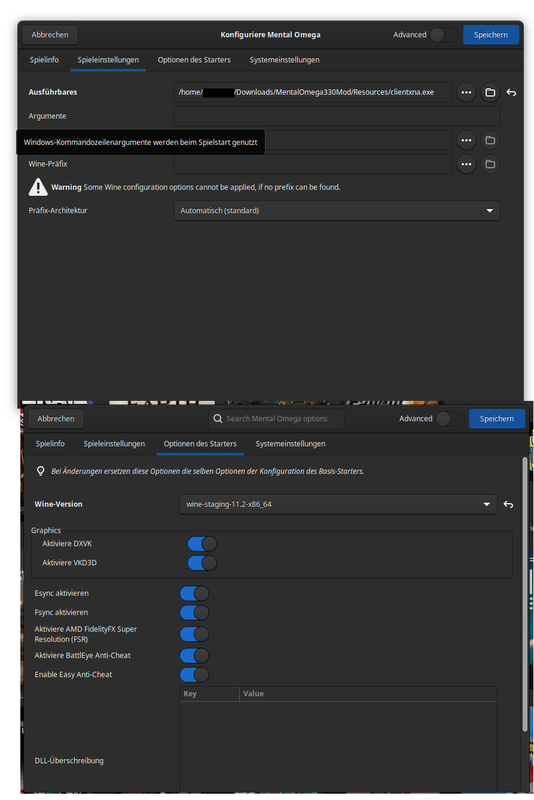
- Open Lutris and add the Mental Omega Directory as "Add locally installed Game" (Lutris is a Tool for Linux to help with compatibility)
- In the Configuration Menu, open the "Game Settings Tab, point the Directory "Executable" to the "clientxna.exe"
- In the "Starter Options" Tab, choose "wine-staging (...)" as Wine Version.
The Launcher should now work if you start the Game.
- In the Launcher, I chose "CnC -DDraw" as Renderer.
Any Linux Experts can probably find a better or smarter way, but this is how I managed to get it to work - not a lot of experience with Linux yet. For context, I have Ubuntu as Distribution and have a full AMD System (Both CPU and GPU).
Screenshot of the Lutris Settings (Imgur didn´t work): https://i.postimg.cc/nccXhSMF/Mental-Dings.png
u/Shettyhengst — 13 hours ago