
PsUi: PowerShell UIs made slightly less shitty
I've worked on this over the past year and change. It's probably most useful for internal tools (tools for your helpdesk or whatever). It abstracts the horror of WPF over PowerShell into a slightly more palatable experience.
It'll allow you to avoid XAML. You won't have to worry about runspaces or Dispatcher.Invoke. You call functions, things show up on screen, the window doesn't freeze when your script runs. All the threading shit is buried in a C# backend so you can worry about the actual PowerShell logic.
If you've ever tried to implement WPF for PowerShell properly (runspace pools, synchronized hashtables, dispatchers) you know that setup is a massive pain in the balls from the start. One wrong move and your UI thread has shit the bed, your variables are gone, and your beautiful form has collapsed in on itself with the weight of a neutron star. I went through all of that so you don't have to. My sanity went to hell somewhere around month four but hey, the module (probably) works.
So how it actually works: your -Action scriptblocks don't run on the UI thread. They run on a pre-warmed RunspacePool in the background (pool of 1-8 runspaces, recycled between clicks so there's no spinup cost). When you define a control with -Variable 'server', the engine hydrates that value into the runspace as $server before your script runs, and dehydrates it back to the control when it's done. It's by-value, not by-reference, so form data (strings, booleans, selected items) round-trips cleanly. If you need to pass heavier objects between button clicks there's a $session.Variables store for that.
The host interception is there because running scripts off the UI thread breaks every interactive cmdlet. Write-Host doesn't have a console to write to. Read-Host has nobody to ask. Write-Progress has nowhere to render. Get-Credential just dies. So PsUi injects a custom PSHost that intercepts all of that and routes it back to the UI. Write-Host goes to a console panel with proper ConsoleColor support, Write-Progress drives a real progress bar, Read-Host pops an input dialog on the UI thread and blocks the background thread until you answer, Get-Credential does the same with a credential prompt, and PromptForChoice maps to a button dialog. The output batches in chunks so if your script pukes out 50k lines the dispatcher queue doesn't grow unbounded and murder the UI.
Controls talk to the background thread through a proxy layer that auto-marshals property access through the dispatcher. You don't see any of this, you just write $server and it works.
New-UiWindow -Title 'Server Tool' -Content {
    New-UiInput -Label 'Server' -Variable 'server'
    New-UiDropdown -Label 'Action' -Variable 'action' -Items @('Health Check','Restart','Deploy')
    New-UiToggle -Label 'Verbose' -Variable 'verbose'
    New-UiButton -Text 'Run' -Accent -Action {
        Write-Host "Hitting $server..."
        # runs async, window stays responsive
    }
}
Controls include inputs, dropdowns, sliders, date/time pickers, toggles, radio groups, credential fields, charts, tabs, expanders, images, links, web views, progress bars, hotkeys, trees, lists, data grids, file/folder pickers, and a bunch of dialogs. Light theme by default, dark if you pass -Theme Dark.
PSGallery:
Install-Module PsUi
https://github.com/jlabon2/PsUi
GIF of it in action: https://raw.githubusercontent.com/jlabon2/PsUi/main/docs/images/feature-showcase.gif
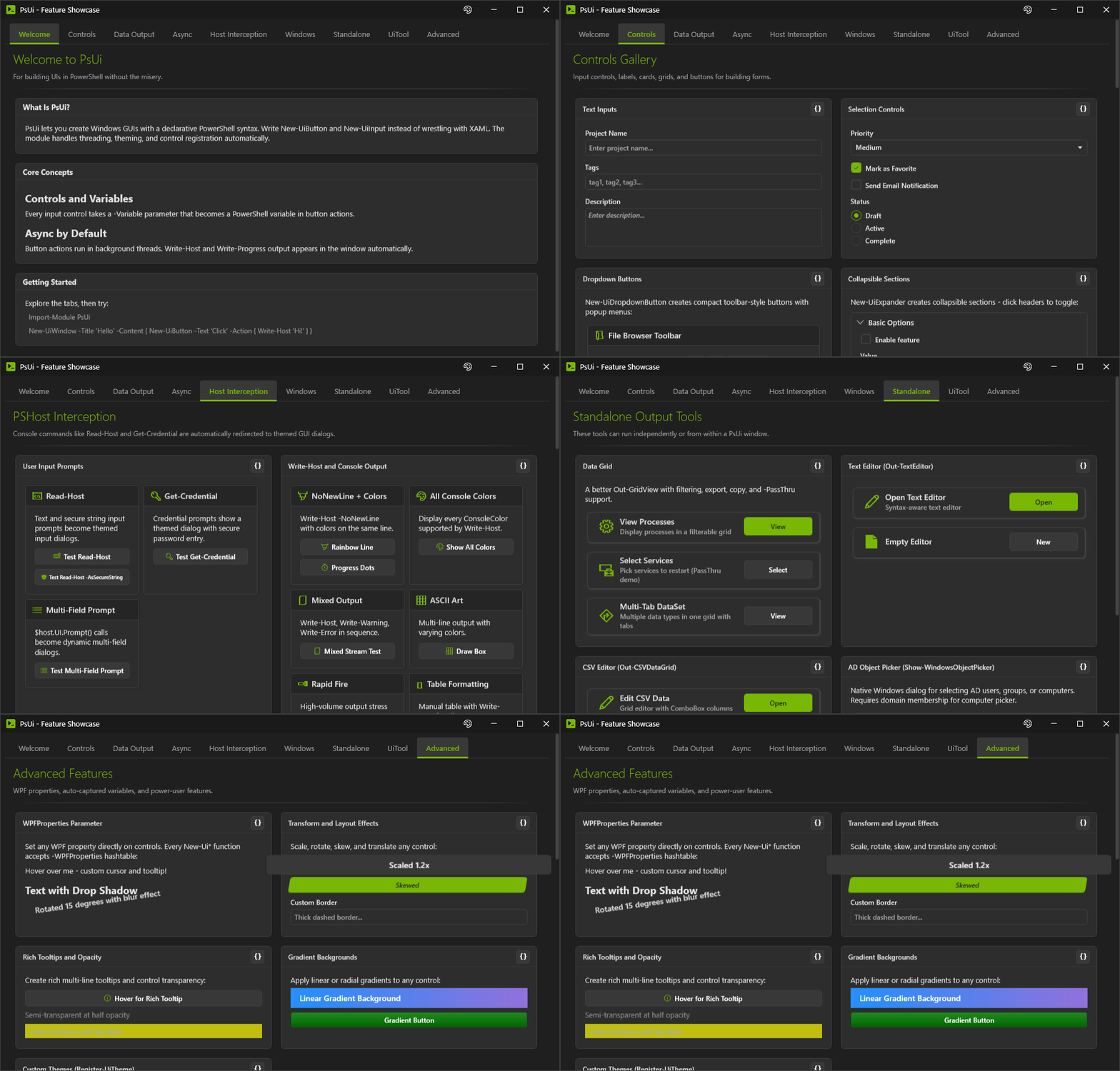
Works on 5.1 and 7. If you do try it and anything breaks, please open an issue and let me know.